Export reports as PDF or CSV
Every report on the platform exports as CSV, and several also offer Excel. PDF is the exception — no shift or payroll report produces one on the server. The three pay reports give you a Print button that prints a stripped-down version of the page, which is where their PDF comes from, and only form submissions are rendered as true PDFs.
What do I need before I start?
The role that owns the report. Exports carry the same data as the screen, so they carry the same restriction. The shift and payroll reports are Admin and Manager. The Audit Trail export is open to the six management roles. Agency Reports adds Agency Admin and Agency Coordinator, scoped to their own agency, and excludes Control.
Rows on screen. Most export buttons are disabled while the report is empty, and the ones that are not will tell you to generate a report first. Nothing exports a query you have not run.
A generated report, on Agency Reports specifically. Its Export button checks that a report exists before it does anything and shows Please generate a report first before exporting. if not.
How do I export a report?
- Open the report and set its date range and filters.
- On the pages that need it — Pay Summary, Pay Detail, Payroll & Charge, Absences, Agency Reports — press Generate (or set the filters, on Agency Reports) so the table is populated.
- Press the export control in the header. Depending on the report that is Export, Export CSV, or a CSV / Excel / Print trio.
- The file downloads immediately. Nothing is emailed, queued or stored — the export exists only in your downloads folder.
Which report gives me what?
| Report | CSV | Excel | |
|---|---|---|---|
| Reports (shift and payroll) | Yes, built in the browser | No | No |
| Pay Summary | Yes | Yes, as .xls |
Print only |
| Pay Detail | Yes | Yes, as .xls |
Print only |
| Payroll & Charge | Yes | Yes, as .xls |
Print only |
| Absences | Yes | No | No |
| Agency Reports | Yes, built on the server | Supported by the endpoint, not offered by the button | No |
| SIA Compliance | Yes | No | No |
| Audit Trail | Yes | No | No |
| Form submissions | Yes | Yes, a true .xlsx |
Yes, a true PDF |
So where does a PDF actually come from?
Two places, and only one of them is a real PDF file the platform produces.
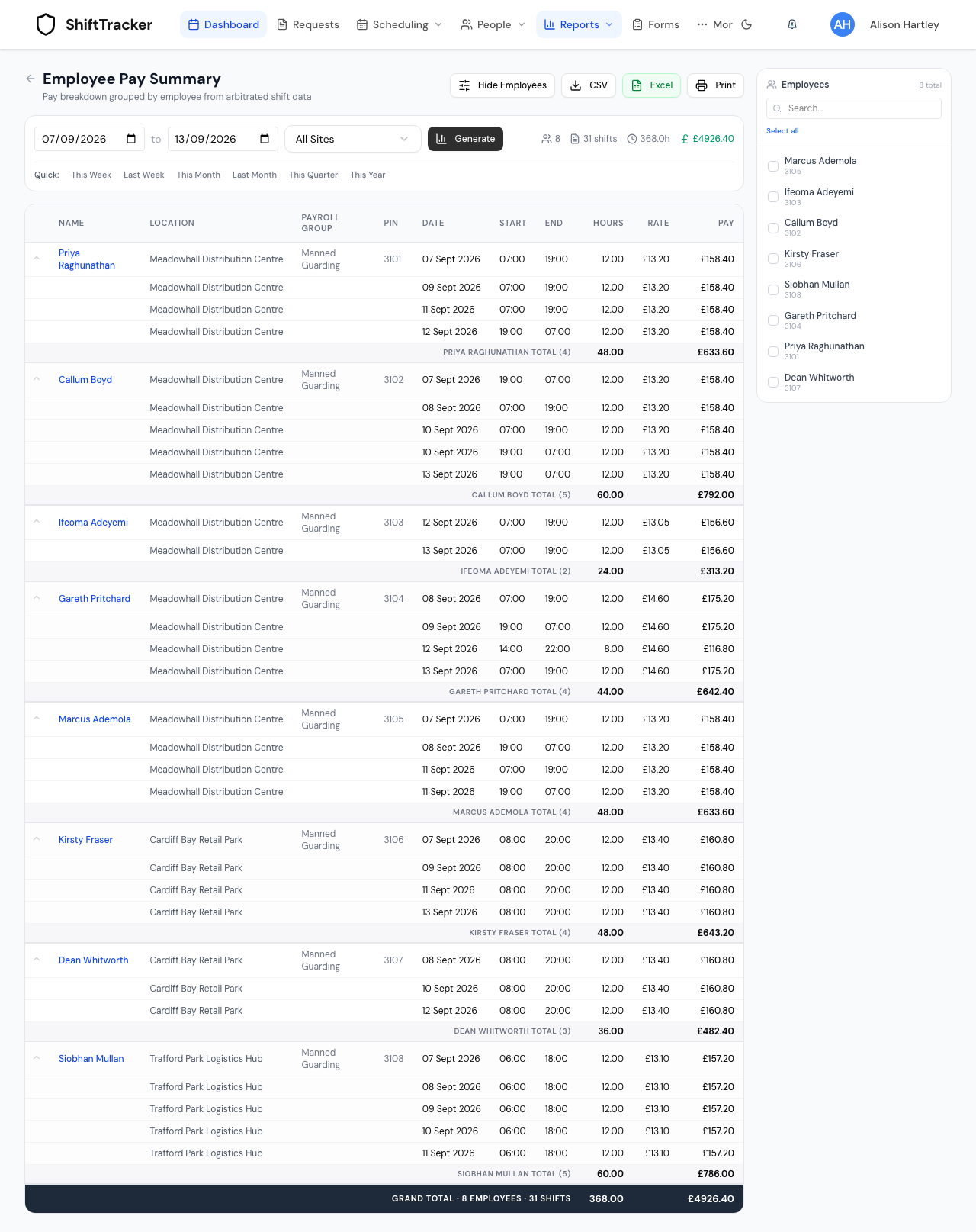
Print, on the three pay reports. The button calls your browser's print dialogue against a page that carries a print stylesheet: the navigation, the header, every button and the employee sidebar are hidden, and table headers are given a grey fill that survives printing. From that dialogue you choose your printer, or Save as PDF. The layout and the page breaks are your browser's, not the platform's.
A form submission. The Print button on a submission opens a server-rendered PDF in a new tab, with the organisation's branding and a consistent layout. From the submissions list you can also select rows and choose Export as PDF (zip), which renders each one and returns them zipped.
There is no PDF of the shift report, the payroll report, the pay reports, the absence report, the agency report or the audit trail. If somebody has asked for one of those "as a PDF", the honest route is Print and Save as PDF for the three that have a print layout, and CSV or Excel for the rest.
What is in each file?
Reports (shift and payroll). A flat CSV of the Shifts tab, one row per shift, with the header Employee, Employee #, Site, Date, Start, End, Status, Scheduled Hrs, Actual Hrs, Rate, Pay. Two things to know: it always exports the Shifts data even if you are looking at the Payroll tab, and it ignores the Search box — you get every row the date range and the three filters returned, not the subset on screen.
The pay reports. The CSV opens with the report name, the date range and a generated-at timestamp, then the columns, then a subtotal row per employee and a grand total at the end. The Excel button produces a styled HTML table saved with an .xls extension. Excel and most spreadsheet tools open it happily; anything expecting a genuine .xlsx workbook will not.
Agency Reports. This one is built on the server and is a formatted document rather than a table: banner headings for export information, an executive summary of key metrics, status analysis, agency performance, site utilisation and officer rankings, then a footer. The endpoint can also emit a genuine multi-sheet .xlsx workbook with the same content, but the screen only wires up the CSV button, and the endpoint refuses any other format with Only CSV and Excel formats are supported.
SIA Compliance. A flat CSV, written with a byte-order mark and with licence numbers forced to text so a spreadsheet cannot reformat them into something else.
Audit Trail. Covered in full on Audit reports — twelve columns including the actor's IP address, capped at 10,000 rows.
Form submissions. CSV and Excel flatten the answers into columns and cap at 5000 submissions. The PDF export renders each submission individually and is capped at 25, because each one fetches its attached media.
If it goes wrong
| What you see | What it means |
|---|---|
| The export button is greyed out | The report has no rows. Widen the date range or clear a filter. |
| Please generate a report first before exporting. | Agency Reports only. Set the filters so the report runs, then export. |
| No data to export | Same cause on the pay reports — the report ran but returned nothing. |
| The CSV has more rows than the screen | The Search box on the shift report narrows the table only, never the export. |
| The Pay Summary total row looks shifted | It is. The per-employee total and grand-total rows put the pay value one column to the right of the Pay (£) heading. The figure is correct, the column is not. |
Excel warns the file is not really .xls |
Expected on the three pay reports — the file is an HTML table with an .xls extension. Open it anyway, or take the CSV. |
| The PDF zip is refused for a large selection | The PDF export is capped at 25 submissions per go. Narrow the selection. |
| The export is truncated without warning | The audit export caps at 10,000 rows and the form exports at 5000. Narrow the date range. |
Related
Last updated 2026-08-13