Patterns, seats and ad-hoc shifts
A shift pattern describes cover that repeats at a site — a start and end time, the days it runs, and how many people it needs. Each person the pattern needs is a seat. A shift that does not belong to any pattern is ad-hoc.
"Seat" is a word for the idea, not a word on screen. What the screen shows is described below.
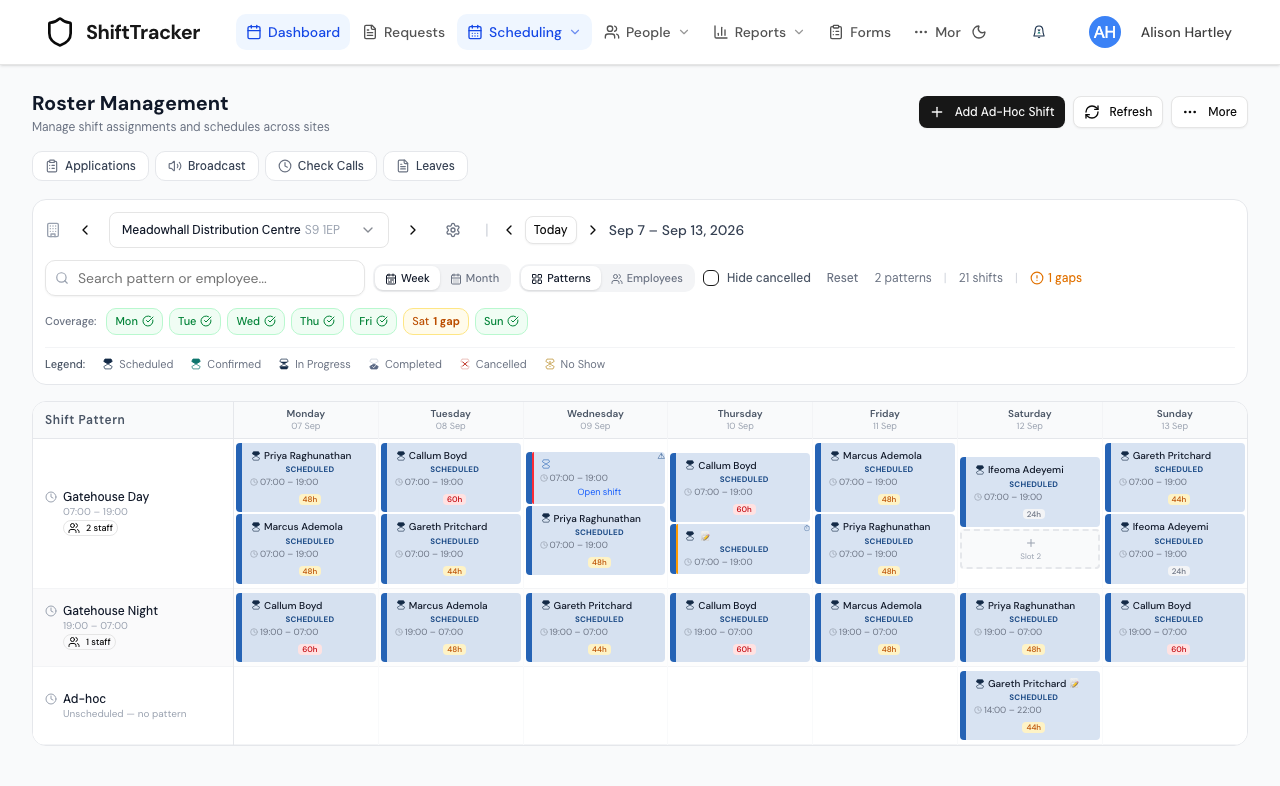
Which roster view is this about?
The roster opened on Week with the row toggle set to Patterns — how an organisation opens it by default, and the only view with a row per pattern.
Employees lists shifts under the person working them instead. A shift nobody is assigned to has no row to sit in, so open seats and unfilled ad-hoc shifts do not appear there.
Month lays the site out as a calendar. It still shows each pattern's open places day by day, but it has no pattern rows, and a shift belonging to no pattern does not appear on it at all.
Agencies open the roster on Week + Employees. Patterns are set up on an organisation's sites, so an agency that switches to Patterns may find no rows to show.
What is a seat?
A pattern that needs two guards on a Monday night has two seats on that Monday. Its row on the roster carries a badge reading 2 staff, and it gets a cell on each day of the week it runs. That cell shows one place per seat; where a pattern needs more than one person, the empty places are numbered Slot 1, Slot 2 and so on.
A place with no shift in it is an open seat. The cell's menu offers Add Shift to fill it in-house, and when you raise a request, Pick existing slot offers the same open places for an agency to cover.
A pattern can also be limited to a range of dates. Its row is drawn for any week that range touches, so a day outside the range can still show empty places on the roster that Pick existing slot will not offer.
Why does the slot picker offer fewer seats than the pattern needs?
Pick existing slot stops offering a seat once a shift occupies it — a shift with somebody assigned, a shift already sent to an agency, and a shift added to the roster but not yet filled all count. The cell still needs the same number of people; what changed is how many of those places are free.
A shift sitting in the cell with nobody assigned and no request against it is still offered. What changes is its form: it comes up as that shift rather than as an empty seat.
Cancelling a shift is the exception, and the two surfaces disagree about it. On the roster a cancelled shift is not one of the cell's places: unless Hide cancelled is ticked it is drawn as an extra tile beneath them, so a cell that has had a shift cancelled can show more tiles than the pattern has seats. After a cancellation, read the cell itself rather than trusting either count.
What makes a shift ad-hoc?
An ad-hoc shift has no pattern behind it. It is created for a one-off need — extra cover, a request raised through New ad-hoc slot for a hand-picked date and time rather than from a pattern seat, or a shift added outside the normal rota. Because it belongs to no pattern cell, Week + Patterns collects all of a day's ad-hoc shifts into one row beneath the pattern rows, labelled Ad-hoc with Unscheduled — no pattern under it.
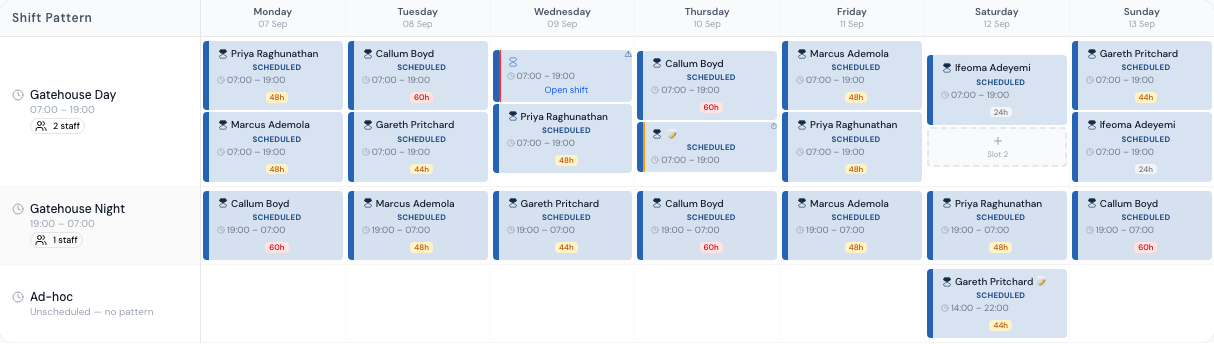
A site can hold more than one ad-hoc shift starting at the same time. When you raise a request through New ad-hoc slot and the site already has an ad-hoc shift starting then, the form asks you to confirm before adding a second — that confirmation is what separates a deliberate second shift from an accidental double submission.
Your request attaches to the shift already there, rather than adding a second, only when that shift meets every one of these conditions:
- it runs the same hours, to the minute;
- it is not cancelled;
- no employee is named on it;
- no other request is already against it;
- nobody is assigned to work it.
If any one of them fails, you are asked to confirm instead.
A pattern seat starting at the same time never raises the question. How many shifts its cell can hold is governed by the pattern's own seat count.
Related
Last updated 2026-08-12