Your agency roster
Scheduling → Roster shows the week's work for your officers: one row per officer who has a shift, and each shift an organisation has confirmed, marked Client. Click a shift for its details, check calls and history. Shifts an organisation confirmed are changed through the request, not here. Several buttons the roster shows are not working for agencies yet; this page says which.
Who can use it?
Agency Admins and Agency Coordinators, from Scheduling → Roster.
What does it show?
Roster Management, on the Employees view: one row per officer who has a shift that week, and a column per day. Officers with nothing that week do not get a row.
- Step through weeks with the arrows beside the dates; Today comes back to this week.
- Search pattern or employee... narrows the rows; Hide cancelled leaves cancelled shifts out.
- Each shift shows its site, its times and its status. Client marks a shift at an organisation's site — one you won through a request.
- Refresh reloads the week; More → Print Roster prints it.
- More → Email schedules… e-mails each officer who has a shift that week their own schedule: see Email officers their schedule.
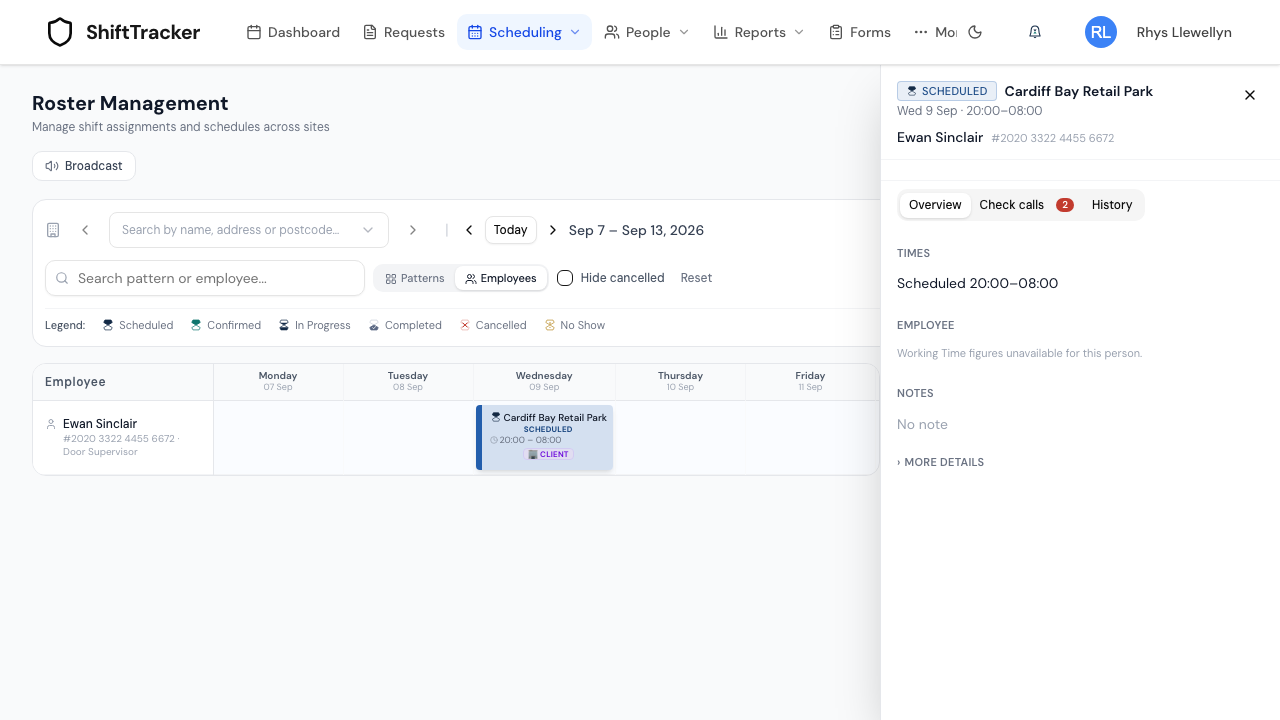
What is on a shift's panel?
Click a shift. The panel names the site, date, times and officer, with three tabs:
| Tab | Shows |
|---|---|
| Overview | The times, the officer's Working Time figures where known, and notes |
| Check calls | The shift's book-on, check calls and book-off, and how many were missed |
| History | What has happened to the shift |
A shift an organisation confirmed, still to come, also says Confirmed by an organisation. To change the officer, use Request an officer change on the request. — see Change or withdraw a proposal. There is nothing to edit on it here. Once it has passed, the panel is information only.
Can an officer ask to come off a shift?
The panel can answer such a request: it shows the officer's reason with Approve and Deny. Denying tells the officer. Approving a shift an organisation confirmed tells the officer and the organisation's Admins and Managers, who decide how to cover it; the officer stays on the shift until they do.
Today, though, nothing in the officer portal or the mobile app lets an officer send that request, so you will not see one in normal use.
What is not working for agencies yet?
The roster is shared with organisations, and some of its controls appear for agencies without working for them:
| Shown | What happens |
|---|---|
| Broadcast | Its list is always empty for an agency |
| More → Export CSV | Greyed out without a site picked |
Plan your officers' work through requests: what an organisation confirms appears here by itself. See Find requests and propose officers.
Related
Last updated 2026-10-09