Keep officers' compliance documents
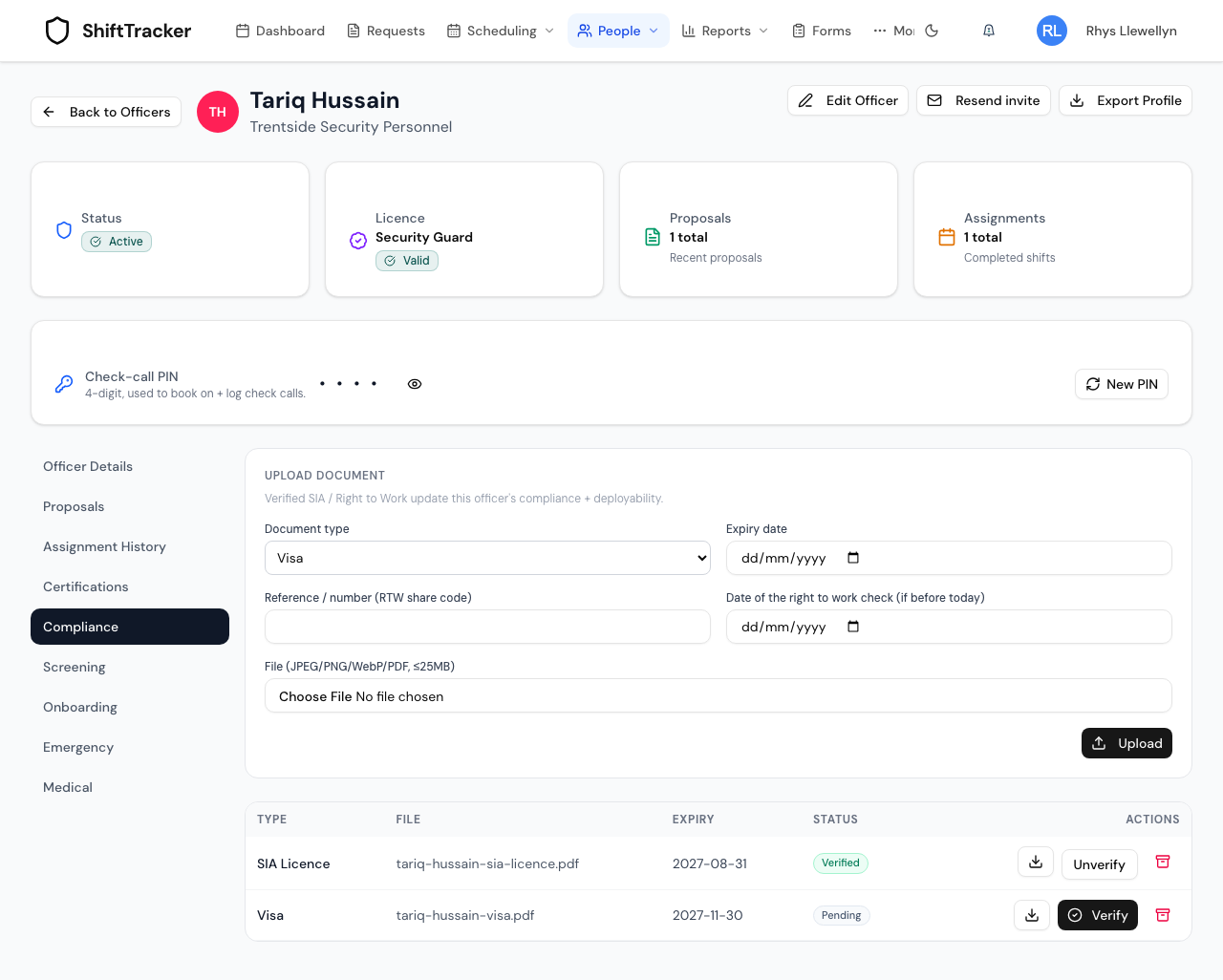
An agency keeps each officer's SIA licence, right-to-work documents and other evidence on the Compliance tab of the officer's profile. An Agency Coordinator uploads and verifies right-to-work copies; an Agency Admin does everything, including SIA licences, un-verifying and archiving. Verifying a licence or visa is what lets ShiftTracker block a deployment when it runs out, and the organisations an officer works for see what you hold.
Who can do what?
| Action | Agency Admin | Agency Coordinator |
|---|---|---|
| Open the Compliance tab, see the list, download a file | Yes | Yes |
| Upload a document | Yes | Right-to-work copies only (passport, visa, work permit, online right to work check), dated today |
| Verify | Yes | Right-to-work copies only |
| Unverify | Yes | No |
| Archive | Yes | No |
A Coordinator sees Verify only on unverified right-to-work copies, and never the Unverify and archive buttons.
Online Right to Work Check is the type for the result of the Home Office online check (the share-code result, for an eVisa and similar). It counts as right-to-work evidence like a visa: its expiry is when a follow-up check is due. Don't file right-to-work evidence as Other: organisations never see that type.
The tab belongs to the officer's own agency. An organisation the officer works for never sees it; it sees a read-only view of some of the same documents, described below.
How do I upload a document?
- Go to People → Officers and open the officer.
- Choose the Compliance tab.
- Under Upload document, choose the Document type.
- Set the Expiry date if the document has one. This is the date the deploy block and the expiry alerts read, so a licence or visa uploaded without one is never chased.
- Fill in Reference / number. For an SIA licence the label reads (SIA number); for a visa, work permit or online right to work check it reads (RTW share code).
- For an SIA licence, also fill in SIA licence type.
- For a passport, visa, work permit or online right to work check done on an earlier day (Agency Admin only), set Date of the right to work check (if before today) — see the next question.
- Choose the file (File (JPEG/PNG/WebP/PDF, ≤25MB)) and press Upload.
The document arrives as Pending. Nothing about the officer's compliance changes until it is verified.
When do I use the check date?
When you file the copy later than you checked the original. The right-to-work check has to be done before the officer starts work; the scan sometimes reaches ShiftTracker afterwards. The date must be today or earlier.
Organisations the officer has worked for see every right-to-work copy you hold, whenever you uploaded it; the check date tells them when the check itself was done. They see it as Checked with the date. Only an Agency Admin can enter it.
What does verifying do?
It records that an Agency Admin has looked at the document and it is genuine. From then on:
| Verified document | What changes |
|---|---|
| SIA licence | The officer's licence number, type and expiry on their roster record are filled in from the document |
| Visa or work permit | Right to work is marked on the roster record, with its expiry, unless the document has already expired |
| DBS certificate | The DBS check date is filled in |
| Any of the above | The officer's compliance summary is recalculated |
Unverify reverses it.
How does it stop a deployment?
When you propose an officer for a request, ShiftTracker checks the newest verified SIA licence and the newest verified visa, work permit or online right to work check against the date of the shift. If either has expired by then, the proposal is refused:
- Verified SIA licence expired on {date}, before the shift on {date}
- Verified right to work expired on {date}, before the shift on {date}
A document that is only uploaded, not verified, never blocks anything. Neither does a passport.
How do I archive a document?
- Press the archive button on its row.
- Choose why:
- Replaced or expired — It was this officer's evidence while current. Organisations they worked for in that time still see it.
- Uploaded in error — Wrong file or wrong person. Hidden from organisations straight away.
Nothing is deleted. The file is kept and the row leaves the list. An archived document cannot be archived again, and you cannot change the reason afterwards.
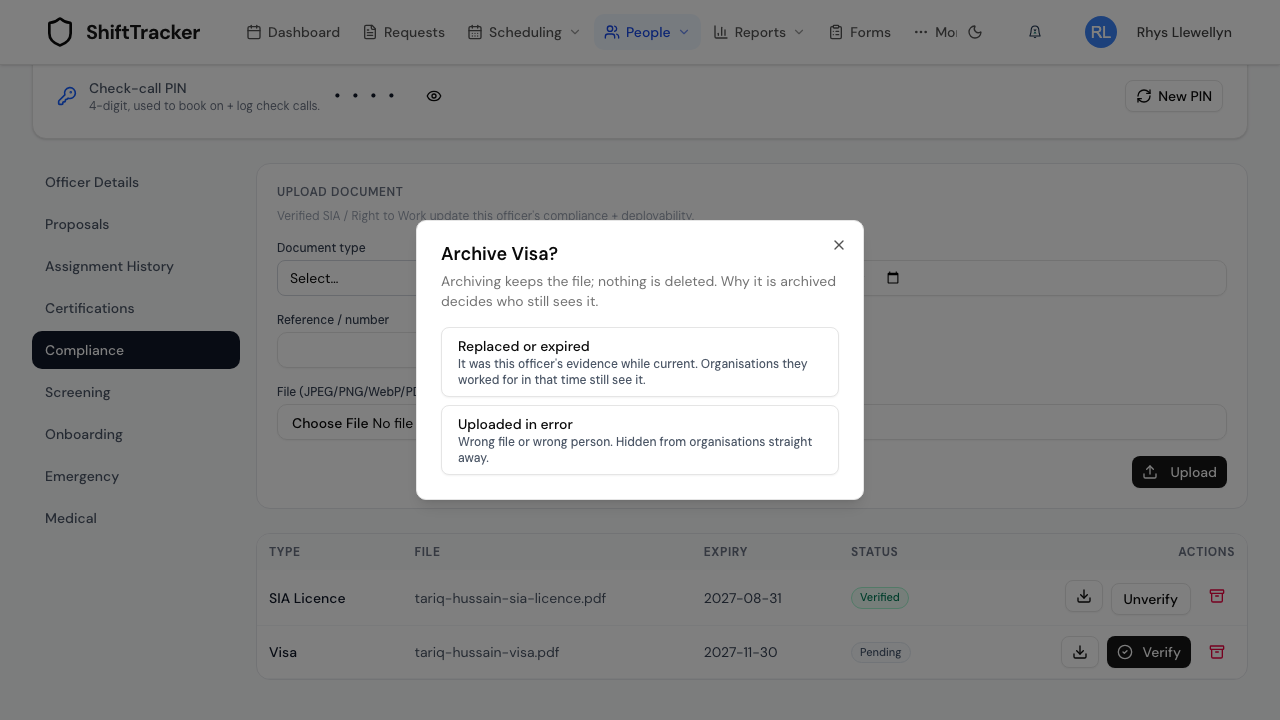
Choose carefully. Right-to-work copies have to be kept for two years after the officer stops working for you, and the organisations they worked for have a right to see the evidence for the time they were on site. Replaced or expired keeps that record visible to them; Uploaded in error removes it.
What do organisations see?
Only the organisations whose requests the officer has worked or is confirmed on, and only part of what you hold:
| Where | What they see |
|---|---|
| The request page, while you propose the officer and while the booking is live | The current SIA licence, passport, visa, work permit and online right to work check |
| The request page and their Right to Work Report, for two years after the officer's last shift for them | Every right-to-work copy you hold (the request page adds the SIA licence), whenever you uploaded it, including copies archived as replaced since the officer started |
They see the document type, file name, expiry, whether you verified it and any check date — and can open the file. They never see the SIA number, the share code or your notes, never see a copy archived as uploaded in error, and cannot change anything. Each time they open a document it is recorded in the audit trail.
Where do I see every officer at once?
People → Officers, on the Compliance tab beside Officers. Each officer has one status, worked out from their newest verified SIA licence and their newest verified visa, work permit or online right to work check:
| Status | Meaning |
|---|---|
| Expired | One of the two has run out |
| Expiring | One runs out within 30 days |
| Incomplete | One of the two is missing, or has no expiry date |
| Compliant | Both verified and more than 30 days from expiry |
| No data | Nothing verified yet |
The table lists SIA expiry, RTW expiry, DBS and Earliest expiry, soonest first. The summary only counts visas, work permits and online right to work checks as right to work, so an officer whose evidence is a verified passport reads Incomplete here.
Will anyone remind me before something expires?
Yes. A daily check looks at each officer's earliest-expiring verified credential, in your agency's own time zone. Agency Admins and Coordinators get an in-app notification once when it is within 30 days of expiry, then every day in the final week, and once more the day after it expires. The officer is e-mailed at the same points, unless they have been deactivated. Only verified documents with an expiry date are checked.
If it goes wrong
| What you see | What it means |
|---|---|
| checkedOn must be a date (YYYY-MM-DD) no later than today | The check date is in the future. |
| Unsupported MIME type … or File exceeds 25MB limit | Use a JPEG, PNG, WebP or PDF under 25 MB. |
| A proposal is refused with Verified … expired on … | The officer's verified licence or right to work runs out before the shift. Upload and verify the renewal, or propose someone else. |
| An officer reads Incomplete although their passport is verified | The summary counts only a visa, work permit or online right to work check as right to work. |
Related
Last updated 2026-10-09