Review form submissions and reports
Every completed form lands on Form Submissions. Admins and Managers review each one — Start Review, Approve or Reject, with a note — and can file a corrected version without losing the original. Submissions export as CSV, Excel or a zip of PDFs. Form Reports charts volume, status and sites over a date range. Managers and Control see only the sites their own staff work at.
Who sees which submissions?
| Role | Sees | Can review | Can correct |
|---|---|---|---|
| Admin | Every submission in your organisation | Yes | Yes |
| Manager | Submissions from the sites an Admin has assigned to them | Yes | Yes |
| Control | The same as a Manager | No | No |
Viewing is forms.submissions.view. A Manager's or Control user's sites are the ones an Admin has ticked under Site managers in each site's Settings. A Manager with no site assigned sees an empty list, and so does one whose sites have all been taken away; an Admin always sees everything. A manager who is locked or terminated, or whose login is deactivated or moved to another role, loses their sites, and the Admin is told which sites are left with no manager.
An employee sees only their own submissions, in the employee portal and the app.
How do I find a submission?
Forms → Submissions opens Form Submissions — Review and manage form submissions. Narrow it by Site, Form, Status, From and To, or Submitter. Each filter shows as a chip you can remove, or Clear all. The list is newest first; sort by Date, Status or Score, and use Columns to hide some.
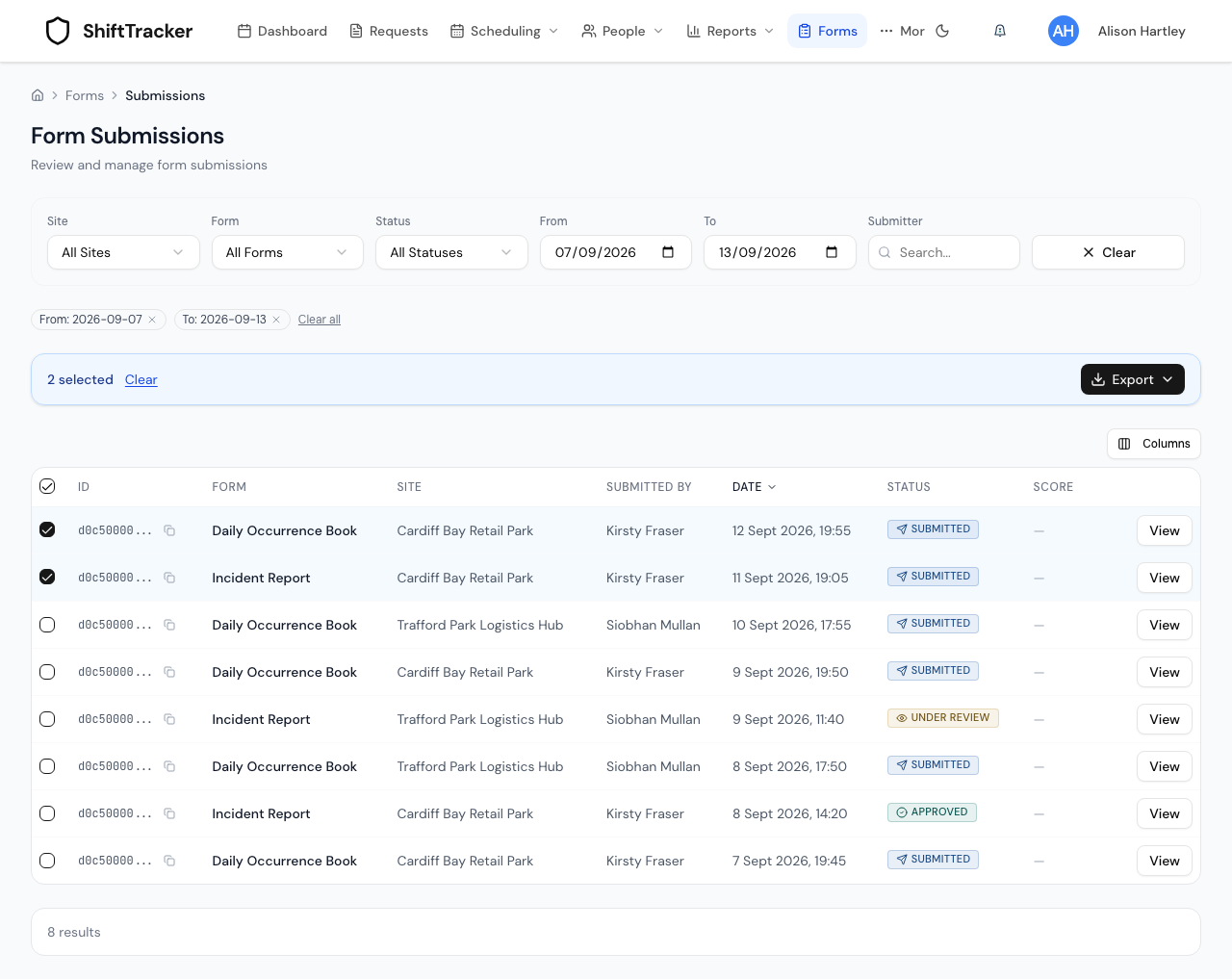
Status is one of Submitted, Under Review, Approved or Rejected. Forms still being filled in are drafts and are not listed.
How do I review one?
- Press View on its row.
- Read the answers under Submission Data. Questions shows how many were answered, Photos how many were taken; photos and locations open from the answers.
- Under Review Actions, add a note if you want — Add review notes (optional)....
- Press Start Review to mark it Under Review, then Approve (A) or Reject. The keyboard's A and R do the same.
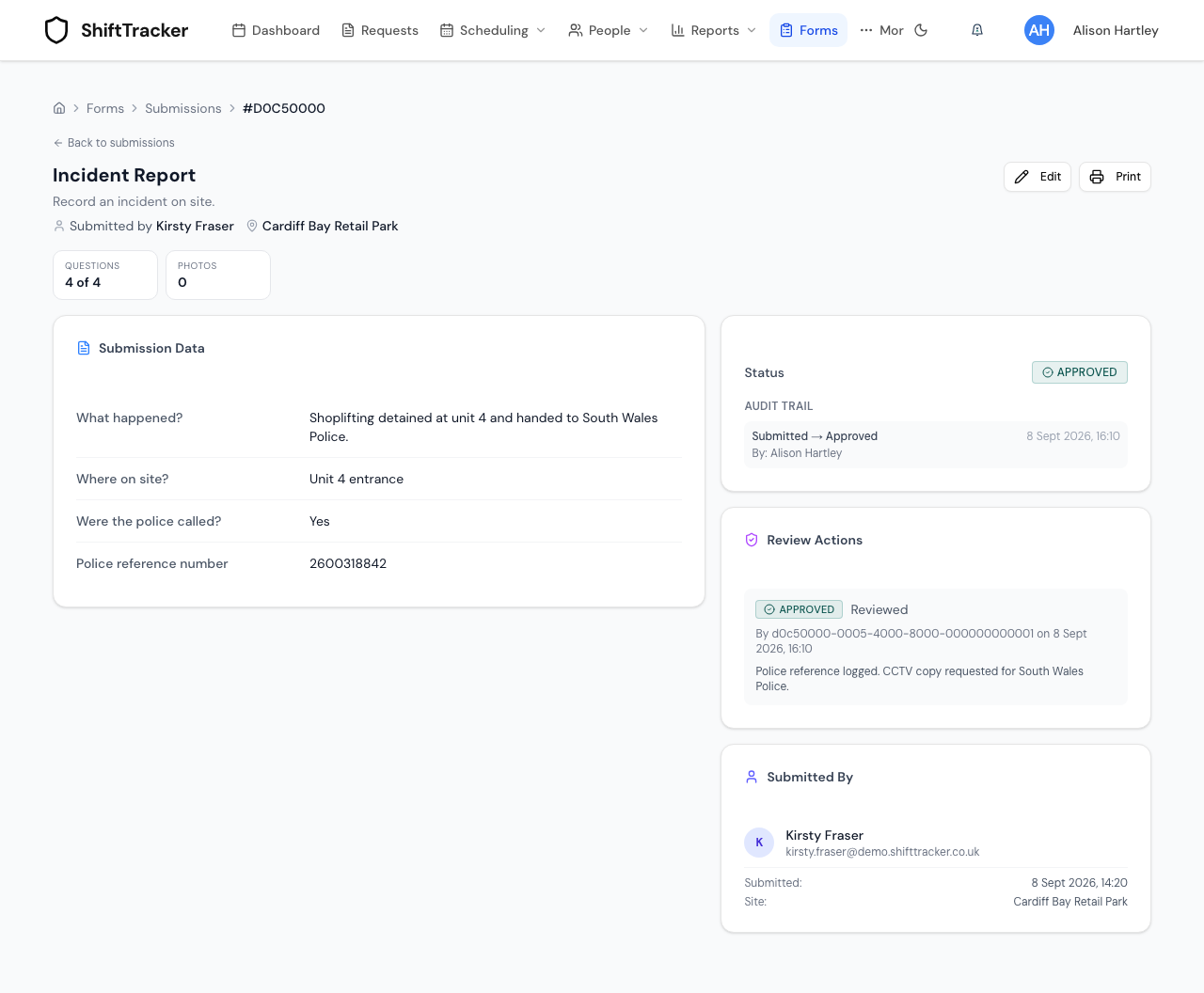
Approved and Rejected are final: the review controls are replaced by who reviewed it, when, and the note. Each change is added to the Audit Trail.
The page also shows when the form was submitted and, for one filled in offline, when it was Completed on device; where it was sent from, and how far that was from the site. An officer's report can arrive up to 7 days after it was filled in — see deploy forms. One that arrived after their access to the site had ended says so in its Audit Trail entry: Sent late: the officer's access to this site had ended when it arrived, with the start time the phone reported.
How do I correct a submission?
Edit, at the top of a submission, files a corrected version. You fill the form in again with the original answers already in it, and send it.
The original is kept, marked This version has been superseded — It is kept for the audit trail and is excluded from reports and exports — with a link to the current version. The new one says This is a corrected version and links back.
The person who sent it can correct it too, as can an Admin or Manager.
How do I export submissions?
- Tick the submissions you want. The header tick selects the page; Select all … matching filters then takes every submission the filters match.
- Press Export and choose Export as CSV, Export as Excel or Export as PDF (zip).
| Format | Holds | Limit |
|---|---|---|
| CSV, Excel | One row per submission | 5,000 |
| PDF (zip) | One printable PDF per submission | 25 |
More than the limit gives the first ones only — Export limited to the first … submissions. Print on a single submission opens its PDF.
What is on Form Reports?
Forms → Reports opens Form Reports — Submission volume, status and site performance. It opens on the last 30 days; change From and To, narrow by Site or Template, and Group By Day, Week or Month.
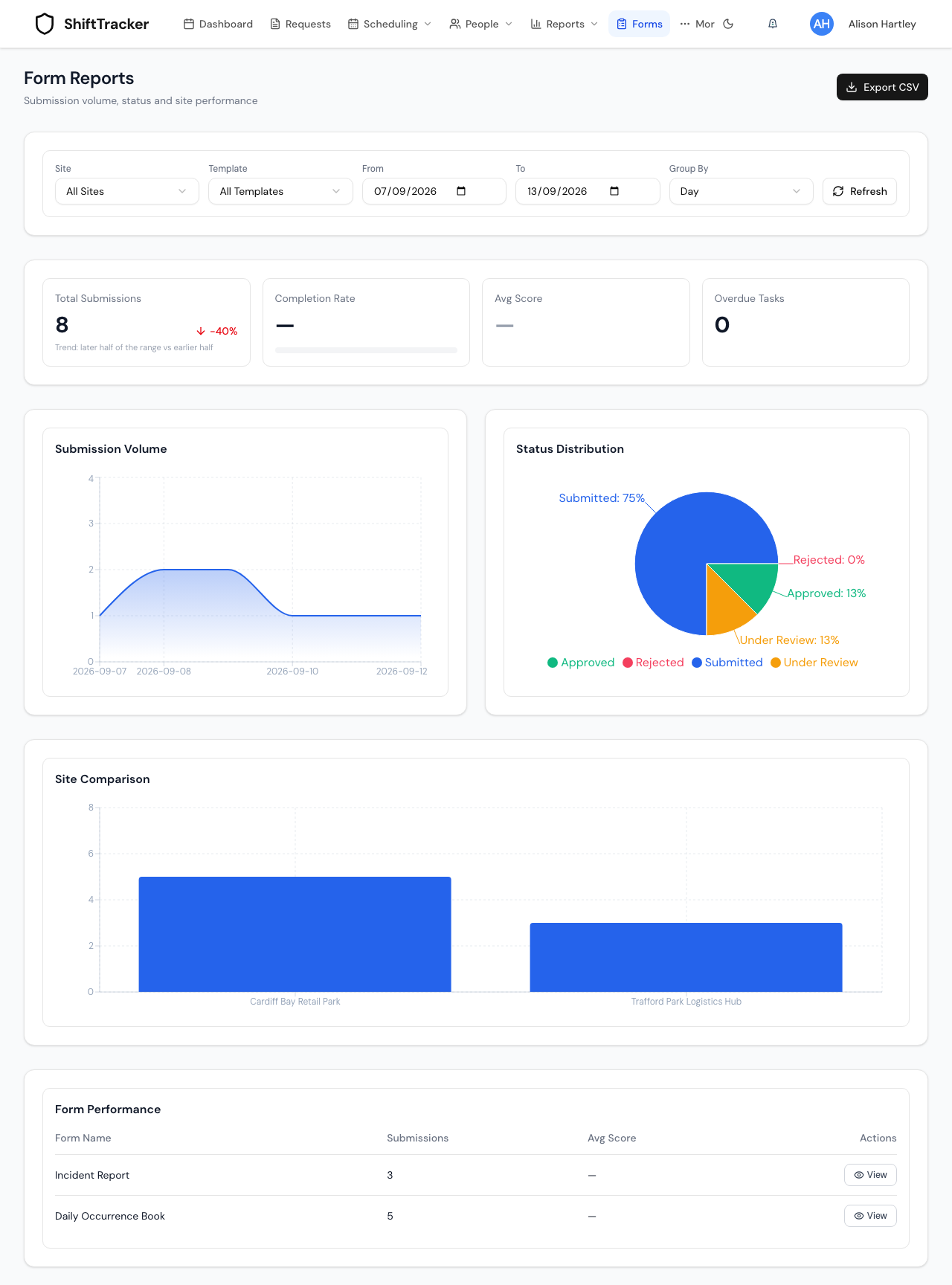
| Figure | What it counts |
|---|---|
| Total Submissions | Submissions in the range. The arrow compares the later days that had submissions with the earlier ones, not the previous period — the card says so. |
| Completion Rate | Of the forms sent to staff after a shift or on a schedule, the share sent back. Always-available forms do not count, so with none sent it reads —. |
| Avg Score | The average score, out of 100, of forms with scoring switched on. With none scored it reads —. |
| Overdue Tasks | Sent forms past their deadline and not yet returned. |
Export CSV downloads the submissions in the range.
If it goes wrong
| What you see | What it means |
|---|---|
| The list is empty, as a Manager or Control | No site is assigned to you. Ask an Admin to tick you under Site managers in the site's Settings. |
| No review buttons | You are Control, or the submission is already approved or rejected. |
| A submission is missing | It may have been corrected — the list shows the current version only — or still be a draft. |
| PDF export is limited to 25 submissions. | Tick 25 or fewer. |
Related
Last updated 2026-10-12