View an agency officer's documents from a request
The request page lets you open the SIA licence and right-to-work copies an agency holds for an officer it proposes or you confirm, while the proposal or booking is live and, once they have worked for you, for two years after their last shift. Every look is recorded in the audit trail.
What do I need before I start?
The permission documents.view.agency_assignment, shown in Settings → Permissions as View assigned agency officers' documents. Admin and Manager hold it by default. An Admin can grant it to a Control user; it can never be given to anyone outside your own staff.
The officer on this request. The request must not be Cancelled, and either:
- the agency has proposed the officer and the proposal is still open (Proposed or Change Requested), with the shift dated no more than two days ago — so you can check the evidence before you accept; or
- the booking is live: the assignment is not completed and the shift is dated no more than two days ago; or
- the officer has worked for you, and their last shift with you was no more than two years ago — the same window as the Right to Work Report.
You see every copy the agency holds now, however long after the shift it was uploaded.
Documents uploaded by the agency. The copies belong to the agency, which uploads and verifies them on the officer's Compliance tab. You cannot add, verify or remove them.
How do I open them?
All officers on the request at once:
- Open the request from Requests.
- Choose the Right to work tab. It lists every officer you may see documents for here — assigned, and those on an open proposal — with their RTW and BS7858 lines.
- Press Show documents on an officer's row.
One officer, from their card: on the Assignments tab (or a proposal on the Proposals tab), press Documents on the officer's card.
Either way you see each SIA licence, passport, visa, work permit and online right to work check, with its type, file name, Verified by agency or Not verified by agency, its expiry date, and any Checked or Archived by the agency note.
- Press View to open a document in a new tab. PDFs and photos (JPG, PNG, WebP) both open in the browser.
- Press Download to save it under its original file name.
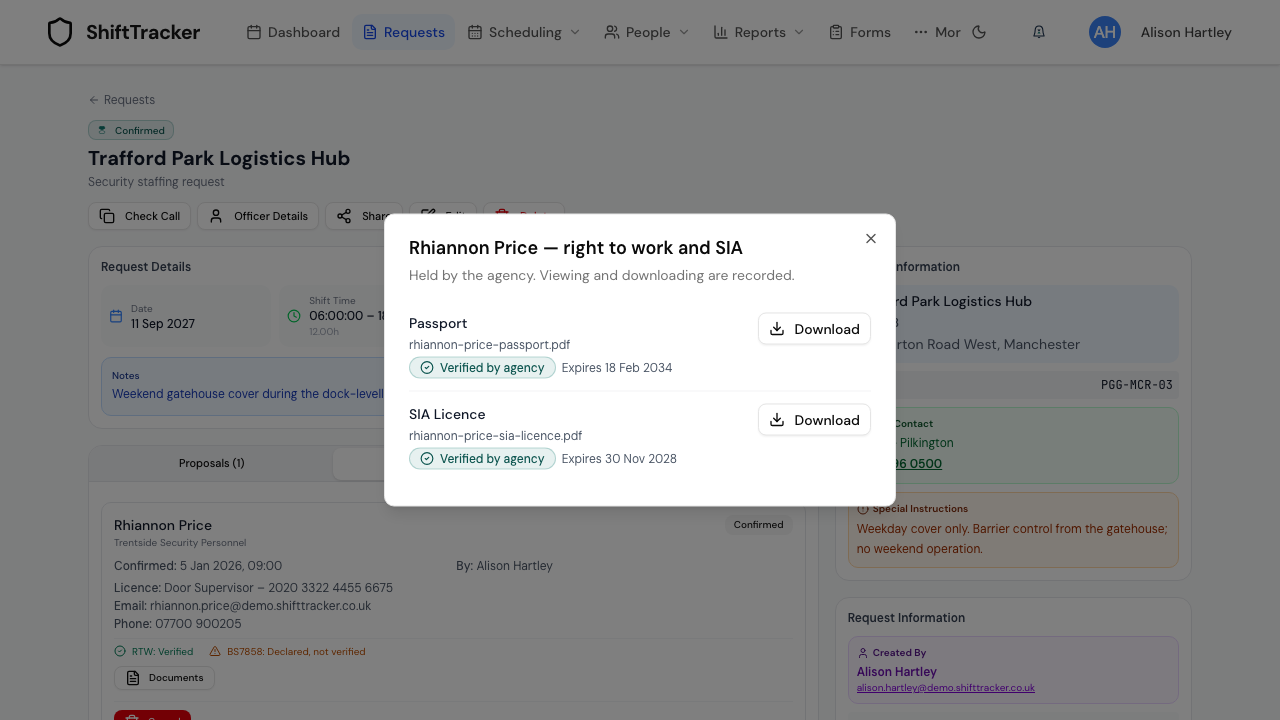
Opening the list, each view and each download are recorded in the audit trail with your name. The file comes through ShiftTracker after a sign-in check, so a copied link opens nothing for anyone who is not signed in with this permission.
What can and can't I see?
You see what the evidence is — its type, file name, expiry and whether the agency verified it — and the file itself. You do not see the SIA licence number, the share code, or any note the agency recorded against the document. While the proposal or booking is live you see the current copies; after the shift you also see a copy the agency archived as replaced since the officer started, marked Archived by the agency.
| Request page | Right to Work Report | |
|---|---|---|
| When | While the assignment is live, then until two years after the officer's last shift with you | From the first worked shift until two years after the last |
| Documents | SIA licence, passport, visa, work permit, online right to work check | Passport, visa, work permit, online right to work check |
| Archived copies | After the shift: copies archived as replaced since the officer started | Copies archived as replaced during or after the engagement |
| Actions | View and Download | View and Download |
| Permission | documents.view.agency_assignment |
documents.view.agency_rtw |
What do the RTW and BS7858 lines on the card mean?
They summarise the agency's records without opening anything:
| Line reads | Meaning |
|---|---|
| Verified to a date | The agency holds a verified visa, work permit or online right to work check valid to that date |
| Verified | A verified passport, with no visa, work permit or online right to work check waiting to be checked — no follow-up date, as on the Right to Work Report's Passport on file — or a verified visa, work permit or online right to work check with no expiry date |
| Expired with a date | The newest verified visa, work permit or online right to work check has run out |
| Declared, not verified | The agency ticked the box on the officer's record, but holds no verified evidence — or holds a visa, work permit or online right to work check it has not verified yet |
| Not recorded | Nothing declared and nothing verified |
For BS7858 the lines are Cleared and Screening in progress (from the agency's screening record), Declared, not verified and Not recorded.
The RTW line follows the same rule as the Right to Work Report, so the two agree.
If it goes wrong
| What you see | What it means |
|---|---|
| No Right to work tab or Documents button | You do not hold documents.view.agency_assignment, the request is cancelled, or the shift was more than two years ago. |
| The dialog says Not found | The shift is over and the officer never worked for you (a no-show, a cancelled roster shift), or their last shift with you was more than two years ago. |
| The dialog says Forbidden | Your permission was removed after the page loaded. Reload the request. |
| No right-to-work or SIA documents have been uploaded by the agency yet. | The agency has not uploaded any, or has archived them all. Ask the agency. |
Related
Last updated 2026-10-28