Onboard officers
An onboarding checklist is the list of tasks to finish for a new officer — documents on file, handbook signed, PIN issued, uniform handed over. An Agency Admin builds the list once as a template under Agency Settings → Onboarding; each officer then gets a copy on the Onboarding tab of their profile, where Agency Admins and Agency Coordinators tick items off. The checklist is a record for your agency: it does not decide whether an officer can be proposed.
Who can do what?
| Task | Who |
|---|---|
| Build and activate the template | Agency Admin |
| Start an officer's checklist and tick items off | Agency Admin, Agency Coordinator |
Officers do not see their checklist.
How do I set up the template?
Agency Settings → Onboarding opens the template. Versions lists every version; the one in use is marked Active. The active version cannot be changed — you work on a draft and then make it active.
- Start a draft: Sample (or Import sample, when there are no versions) copies in a 26-item new-starter list; Clone, while the active version is selected, copies it; New (or Start blank) is empty. Drafts are named Template v2, Template v3 and so on.
- Add item, or an item's edit button, opens the item: a Label, an optional Category that groups it on the checklist, a Sort order, optional Help text, and the ticks Required, Doc upload and Completed date. Press Add or Save. The bin button removes an item.
- Press Activate. The draft becomes the active version, and the one before it stops being active.
Doc upload and Completed date are markers only — the checklist does not ask for a file or a date. The date an item was done is stamped when it is set to Done.
Activating changes nothing for checklists already started; it applies to checklists started from then on. A version that is not active can be deleted with its bin button.
How do I start an officer's checklist?
Nothing creates one automatically — not adding the officer, and not activating a template.
- For one officer: open their profile from People → Officers, choose Onboarding, and press Initialise from active template.
- For everyone: on the template page, select the active version and press Apply to all. Every active officer with a login who has no checklist yet gets one; deactivated officers are left out. Officers who already have one are left alone.
How do I tick items off?
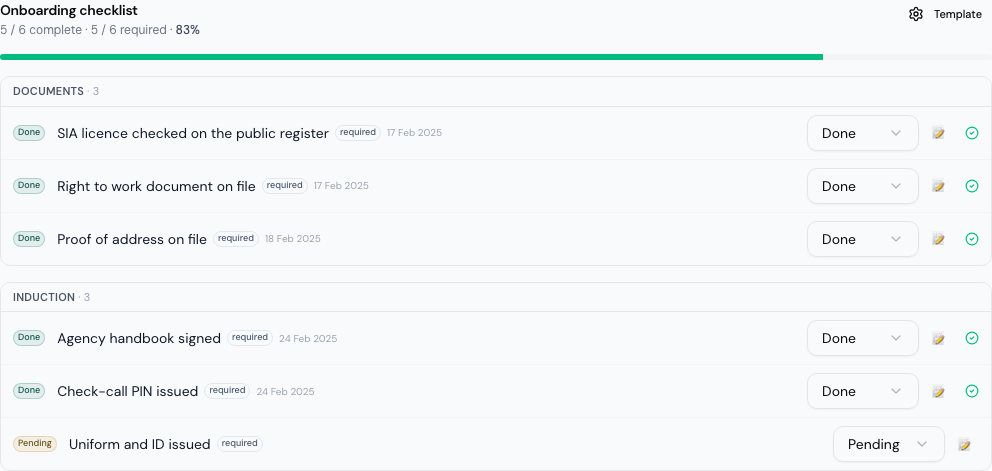
Each item has a status — Pending, Done, N/A (does not apply; counts towards the required items) or Blocked — set with the picker beside it. The note button opens a box for a note, saved when you click away. The top shows how far through the officer is, and All required items complete once every required item is Done or N/A.
Does the checklist stop an officer being proposed?
No. Whether an officer can be put forward depends on their login, their licence and their verified documents — see Find requests and propose officers. Finishing the checklist changes nothing else.
If it goes wrong
| What you see | What it means |
|---|---|
| No Onboarding under Agency Settings | You are an Agency Coordinator. Ask an Agency Admin. |
| No Add item or Activate | You have the active version selected. Clone it first. |
| No active onboarding template when initialising | Nothing is active yet. An Agency Admin must activate a version. |
| A version will not delete | It is active, or an officer's checklist was taken from it. |
Related
- Add and manage officers
- Keep officers' compliance documents
- Screen officers to BS 7858
- Onboarding checklists — the organisation's side
Last updated 2026-10-09