Review proposals and confirm officers
When an agency proposes an officer for one of your requests, you decide: confirm them, or wait for another. Confirming assigns the officer and puts them on the shift. If they are already booked at the same time, you are told what it collides with and can proceed only with a recorded reason. Agencies can also ask to swap the officer; some swaps need your approval.
Who can do this?
Admins, Managers and Control confirm officers — the Confirm buttons, which need assignments.confirm.
Officer changes are reviewed by the same three roles, who see Review Change on the request. The list's Review Changes, for several at once, is for Admins and Managers.
How do I know an agency has proposed someone?
On Requests, a request with proposals reads Proposed, and its row says how many candidates there are and the lowest rate — 1 candidate · from £16.50 — beside a Review button. The request's own page lists every proposal under Proposals.
How do I confirm an officer?
From the list:
- Press Review on the request. Choose an officer opens with each candidate, their agency and rate.
- Press Confirm beside the officer you want.
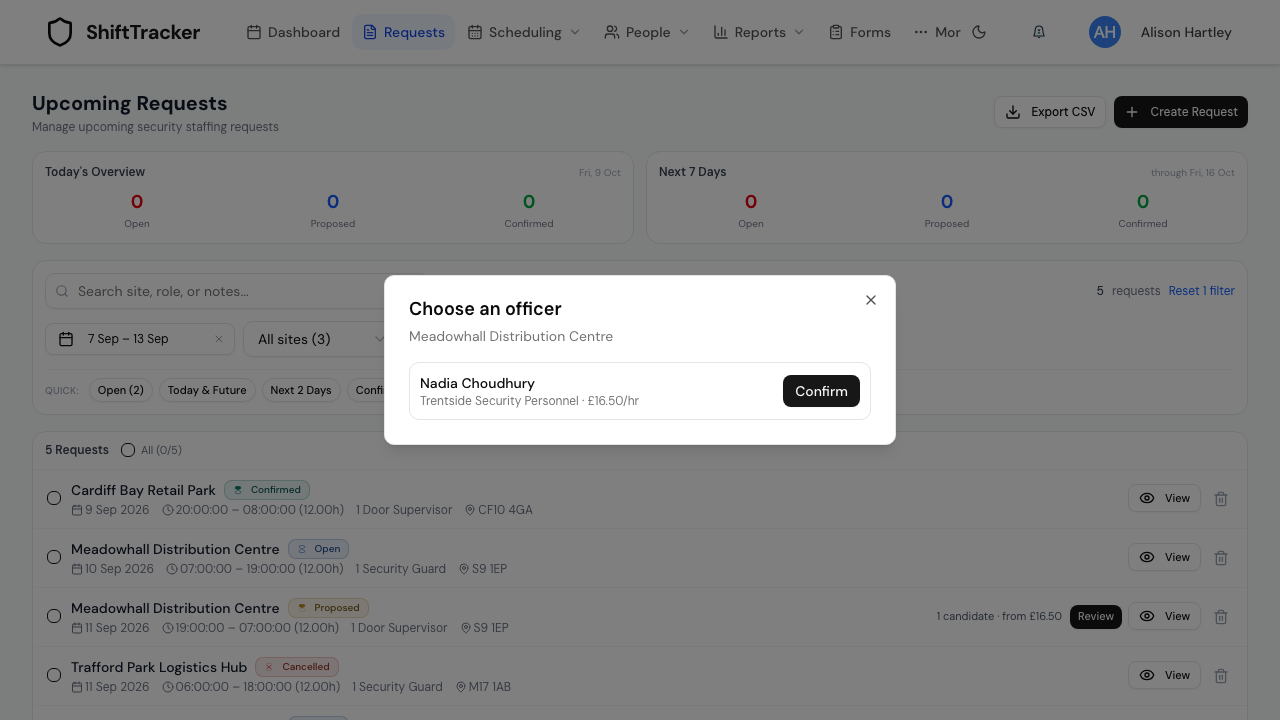
From the request's page:
- Open the request and go to Proposals. Each card shows the officer, their licence and its expiry, contact details, the rate, and their right-to-work and BS 7858 status.
- Press Confirm on the one you want. It changes to Confirm? — press it again to confirm.
The officer moves to Assignments, and a message offers Undo for a few seconds in case you picked the wrong one. A candidate who is already committed at the same time is marked Already committed at this time in Choose an officer.
To confirm several requests at once, tick them on the list and press Confirm. Confirm Proposed Requests asks you to pick the officer for each one — it never picks for you — then press Confirm again.
What if the officer is already booked?
Confirming checks the officer against their other shifts and their working hours.
| What you see | What you can do |
|---|---|
| Name cannot work this shift — They are already confirmed on an overlapping shift | Nothing: this cannot be overridden. Choose another officer. |
| Confirming name raises a conflict | Read what it collides with, then give a Reason for proceeding and press Confirm anyway, or choose someone else. |
The reason is recorded against the assignment with your name. Working Time warnings are kept as evidence. From the list, a conflict sends you to the request's page to decide it there.
How do officer changes work?
An agency can swap the officer it has put forward. Whether you are asked depends on where things stand:
| Situation | What happens |
|---|---|
| You have not confirmed the proposal yet | The agency simply changes its own proposal |
| Confirmed, and the agency's Officer swaps is set to needs approval (the default) | The swap waits for your approval |
| Confirmed, Officer swaps: direct, and the new officer is free and holds the right role | It goes through, and you are notified |
| Confirmed, Officer swaps: direct, but the new officer has a scheduling or Working Time conflict, or lacks the role | It still waits for your approval |
You set Officer swaps for each agency on People → Agencies — Conflicts and role mismatches still need your approval.
A swap waiting for you shows on the proposal as Officer Change Requested, with the current and new officer and the agency's reason.
- Press Review Change on the proposal. Review Officer Change Request shows both officers, the new officer's licence, and the reason.
- Add Admin Notes if you want, and press Approve or Reject.
To decide several, tick the requests on the list and press Review Changes. Review Officer Change Requests lists every waiting change with Approve and Reject for each.
If it goes wrong
| What you see | What it means |
|---|---|
| Forbidden when you confirm | Only Admins can confirm. |
| Request quantity already fulfilled | Every place on the request is already filled. |
| … is committed elsewhere. Open the request to review and accept the conflict. | A conflict found from the list. Decide it on the request's page. |
| Confirm anyway is greyed out | Type a reason first. |
| Couldn't load rates in Choose an officer | The names are current; close and reopen to load the rates and enable Confirm. |
Related
Last updated 2026-10-09