Check agency officers' right to work
The Right to Work Report lists every agency officer who has worked a shift for you in the last two years, with the right-to-work evidence their agency holds and whether it covered the time they worked. You can open the copies themselves, check a share code on GOV.UK and export the list. Each officer stays on it for two years after their last shift, then drops off.
What do I need before I start?
The permission documents.view.agency_rtw, shown in Settings → Permissions as View agency right-to-work documents. Admin and Manager hold it by default. An Admin can grant it to a Control user, but it can never be given to anyone outside your own staff (Admin, Manager, Control). Without it the page reads You don't have access to the Right to Work report.
An agency officer who has worked for you. The report is built from confirmed requests: an officer is on it once they have a confirmed assignment on one of your requests dated before today — or dated today and marked completed. A request that was cancelled, a roster shift that was cancelled or marked a no-show, and a shift dropped at arbitration do not count.
Documents uploaded by the agency. The copies belong to the agency. It uploads them on the officer's Compliance tab and verifies them there; nothing you do on this page changes them.
How do I open the report?
- Go to Reports → Agency Reports.
- Press Right to Work beside SIA Compliance at the top. The button only appears if you hold
documents.view.agency_rtw. - The report opens on every officer, most urgent first: Expired, then Expiring, Not verified, None on file, Valid and Passport on file, and within each the soonest expiry date. Use Search (officer or agency), Agency and Status to narrow it.
A Control user who has been granted the permission opens it from Right to Work report in their dashboard's Quick Actions, since Agency Reports is not open to them.
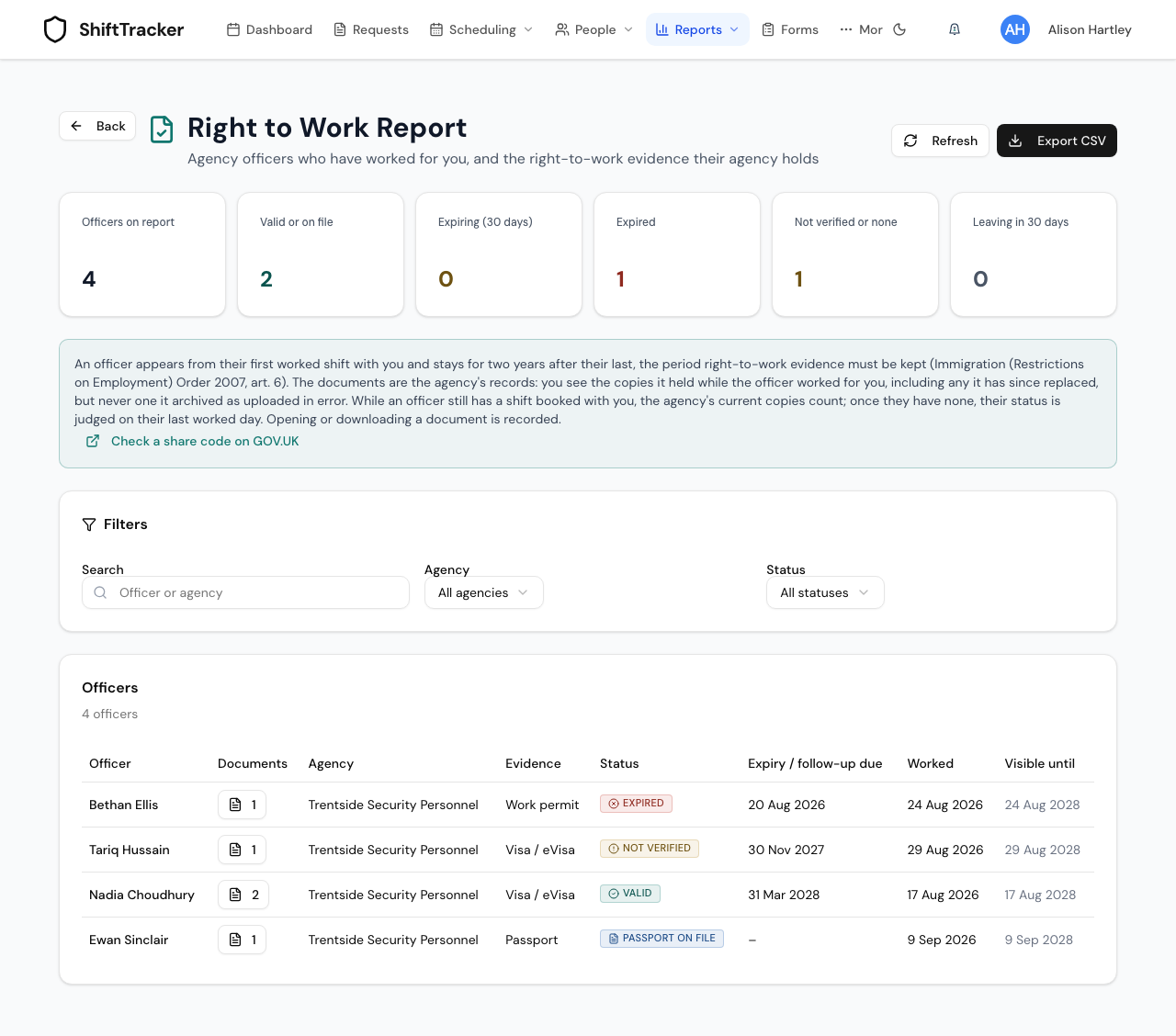
What does each column mean?
| Column | What it shows |
|---|---|
| Documents | How many right-to-work copies you can see for that officer. Press it to open them. Greyed out at 0. |
| Evidence | The document the status is judged on: Visa / eVisa, Work permit or Passport. |
| Status | The outcome, below. |
| Expiry / follow-up due | When time-limited permission runs out, which is when a follow-up check is due. A dash for a passport. |
| Worked | The first and last day the officer worked for you, and Next shift under it if one is booked. |
| Visible until | Two years after the last worked day. It turns amber in the last 30 days. |
Only passports, visas, work permits and online right to work checks (the Home Office share-code result) count. An SIA licence, a DBS certificate or anything else the agency holds is not on this report.
How is the status decided?
| Status | When |
|---|---|
| Valid | The newest verified visa or work permit had not expired |
| Expiring | It runs out within 30 days — only while the officer still has a shift booked with you |
| Expired | It had already run out |
| Passport on file | A verified passport, and no visa or work permit at all |
| Not verified | No visa or work permit is verified but one is waiting to be — or the only copy is a passport nobody has verified |
| None on file | The agency holds no right-to-work copy you can see |
"Had" depends on whether the engagement is still going:
- Officer still booked with you — the status is judged today, against the agency's current copies.
- No shift booked — the status is judged on the officer's last worked day, against the agency's copies. A visa that expired a month after their last shift reads Valid, because it covered every shift they did.
A visa or work permit always outranks a passport. If the agency holds an unverified visa and a verified passport, the officer reads Not verified: for someone who needs permission to work, the passport proves identity, not the permission.
Which copies can I see?
Every right-to-work copy the agency holds for the officer, whenever it was uploaded:
- copies uploaded before, during or after the engagement — a copy the agency filed after the officer's last shift shows too, and reads Checked with the date when the agency recorded when the check itself was done;
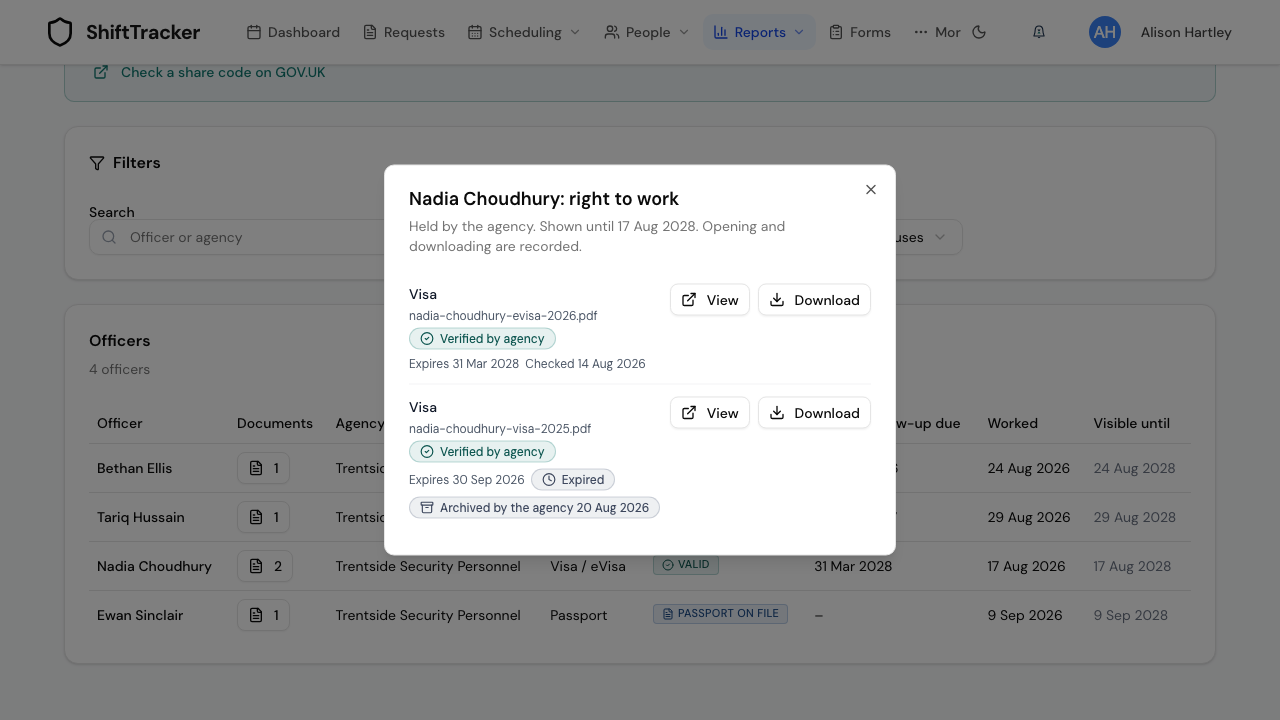
- a copy the agency has since archived as replaced or expired, if it was archived after the officer's first shift — it stays, marked Archived by the agency with the date, because it was the evidence for those shifts.
You never see a copy the agency archived as uploaded in error, or one it archived before the officer first worked for you.
How do I open a document?
- Press the number in the Documents column.
- The dialog lists each copy with its type, file name, Verified by agency or Not verified by agency, its expiry date, and any Checked or Archived by the agency note.
- Press View to open it in a new tab, or Download to save it.
Opening the dialog, viewing and downloading are each recorded in the audit trail with your name. The link the browser follows is valid for five minutes.
Can I check a share code from here?
Not inside ShiftTracker. Check a share code on GOV.UK opens the Home Office's View a job applicant's right to work details service in a new tab. ShiftTracker does not call it and does not record what it says.
How do I export the report?
Press Export CSV. The file has one row per officer — Officer, Agency, Right to work evidence, Status, Expiry / follow-up due, First worked, Last worked, Visible until and Documents — and the export is recorded in the audit trail. It contains no files and no document details beyond those columns.
When does an officer leave the report?
Two years after their last worked shift for you, which is how long right-to-work copies must be kept after employment ends (Immigration (Restrictions on Employment) Order 2007, article 6). Leaving in 30 days counts the officers about to drop off. After that the agency still holds the records; you simply stop seeing them. Nothing is deleted.
If more than 5,000 officers have worked for you, the report shows the 5,000 who worked most recently and says so above the table.
If it goes wrong
| What you see | What it means |
|---|---|
| You don't have access to the Right to Work report | You do not hold documents.view.agency_rtw. An Admin can grant View agency right-to-work documents in Settings → Permissions. |
| No Right to Work button on Agency Reports | Same cause. |
| No agency officer has worked for you in the last two years | No confirmed agency assignment on one of your requests has been worked yet, or every one is more than two years old. |
| An officer you expected is missing | Their only shifts were cancelled, no-shows or dropped at arbitration, or today's shift has not been marked completed. |
| None on file or Not verified | The agency has not uploaded, or not verified, a passport, visa or work permit. Ask the agency; only it can add or verify them. |
| A copy you saw before has gone | The agency archived it as uploaded in error. |
Related
- View an agency officer's documents from a request — before the shift
- Upload employee documents — your own staff's documents
- SIA licence verification
- Audit trail
- Roles and permissions
Last updated 2026-10-09