Find requests and propose officers
Requests shared with your agency appear under Available Requests. To answer one, you propose one or more of your officers at an hourly rate — for one request, or for several at once with a rate each. ShiftTracker checks every officer before the proposal goes in: their licence, verified documents and other bookings. The organisation then confirms one officer or none.
Who can propose?
Agency Admins and Agency Coordinators — SUBMIT_PROPOSALS. You can propose only your own officers, and only those who have accepted their login invite.
Where do requests come from?
From organisations you have an active partnership with, and only the requests they share with you. See Register your agency and accept a partnership. Nothing else reaches your list.
How do I find the requests to answer?
Requests opens Available Requests — Submit proposals for upcoming security staffing requests. It shows requests from today onwards; set the date range, narrow by site or status with the Quick filters, or search by site, role or notes. Any officer narrows the list to the requests a chosen officer has been proposed for.
Each request shows its site, date, hours, the number and role of officers wanted, and the site's postcode, with its status — Open, Proposed, Confirmed or Cancelled. Once you have answered, your own outcome shows beside it:
| You see | It means |
|---|---|
| Proposal Sent and Bid pending | You have proposed, and the organisation has not decided |
| Won | Your officer was confirmed |
| Change pending | You have asked to change the officer on a confirmed shift |
| Not selected | The organisation confirmed someone else |
| Filled by another agency | The request was confirmed with another agency's officer |
How the request then becomes a rostered shift is on How a request becomes a rostered shift, with a picture of this list.
How do I propose an officer?
- Press Propose on an Open request.
- Enter the Hourly Rate (£) you are quoting. It must be more than £0 — The hourly rate must be more than £0.
- Under Select Officers, tick the officer — or several, if you want the organisation to choose. Search officers... narrows the list.
- Add a Message (Optional).
- Press Submit Proposal.
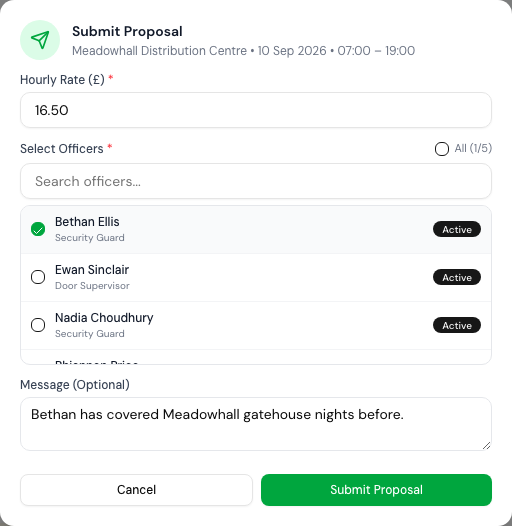
Each officer you tick becomes a separate proposal at the same rate. The organisation's Admins are notified, the request moves to Proposed, and the organisation confirms one of them — or none.
You can answer a request once. To change what you proposed, see Change or withdraw a proposal.
How do I propose for several requests at once?
- Tick the requests in the list, or All open to take every open request you have not answered.
- The bar reads … for proposals; press Submit ….
- Submit Proposals lists each request with its own rate box — Leave blank to use the rate below. Enter a rate per request, or one Hourly Rate (£) for all of them.
- Choose the officers, add a message, and press Submit … Proposals.
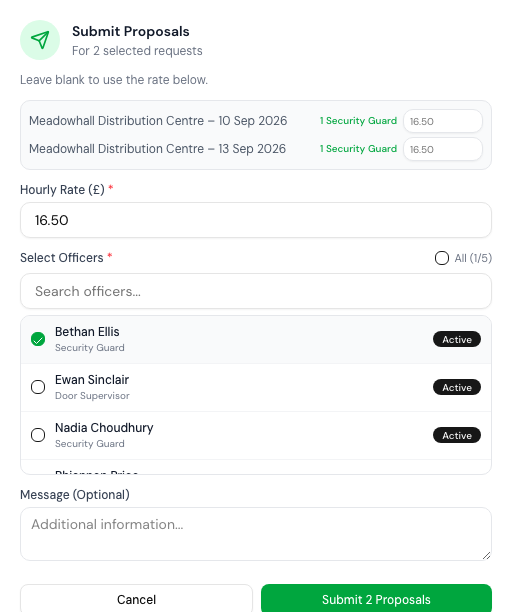
The same officers go forward on every request. Each request is decided on its own: if some go in and others are refused, the message says how many of each, and why.
What is checked before a proposal goes in?
Every officer on every request, against the shift's date. If any one officer fails, nothing is submitted for that request, and you are told which officer and why.
| Refused when | You see |
|---|---|
| The officer is not one of yours | One or more selected officers are not from your agency. |
| They have not accepted their login invite | …haven't accepted their login invite yet, so they can't be proposed. Send them an invite from their profile first. |
| They are deactivated | This officer has been deactivated and cannot be put forward for a shift. |
| Their licence type does not match the role asked for | Officer licence type (…) does not match required role (…) |
| Their licence expires before the shift | Officer licence expired on …, before the shift on … |
| Their verified SIA licence or right to work expires before the shift | Verified SIA licence expired on … or Verified right to work expired on … |
| They are already confirmed on an overlapping shift | … cannot work this shift — This cannot be overridden. |
An officer with no verified documents on file is not refused for that alone.
Other collisions — another proposal at the same time, or a Working Time warning — can be overridden. Proposing … raises a conflict lists what it collides with; give a Reason for proceeding and press Propose anyway. In a batch, each request with a conflict comes up in turn. For a Working Time warning, the reason is kept as a record against the proposal. See Overtime and the Working Time Directive for how Working Time is judged.
If it goes wrong
| What you see | What it means |
|---|---|
| Request not found or not shared with your agency | It was not shared with you, or the partnership is no longer active. |
| Proposals already exist for this request | You have already answered it. Withdraw or change it instead. |
| You already have a proposal for this request… when ticking a row | The same — it cannot go into a batch. |
| Select at least one officer | Tick an officer. |
| An officer is missing from Select Officers | Check they are on your books and active — deactivated officers are not listed. |
Related
Last updated 2026-10-09