Change or withdraw a proposal
Before the organisation confirms your officer, you can withdraw the proposal or swap the officer on it yourself. Once they have confirmed, you can no longer withdraw: you request a change of officer, which the organisation approves — unless it has allowed your agency to change officers directly. If an officer is booked somewhere else at the same time, ShiftTracker shows the clash and lets you free them from the other booking.
Where do I do this?
On the request's own page — View on the request in Requests. Your proposal is listed there with the buttons that apply to it. Agency Admins and Agency Coordinators can use them, on their own agency's proposals only.
| Your proposal is | You can |
|---|---|
| Waiting for the organisation | Withdraw Proposal, or change the officer straight away |
| Confirmed | Change the officer — with the organisation's approval, or directly if they allow it |
| Waiting on a change you asked for | Ask for a different change |
How do I withdraw a proposal?
- Press Withdraw Proposal.
- Confirm in Withdraw Proposal — Are you sure you want to withdraw your proposal?
The proposal is deleted. If it was the last one on the request, the request goes back to Open and you can propose again. The withdrawal is recorded in the audit trail.
Nobody is notified: the proposal simply goes from the organisation's view of the request.
A confirmed proposal cannot be withdrawn — This proposal is confirmed. Remove the assignment before deleting. Change the officer instead, or ask the organisation.
How do I change the officer?
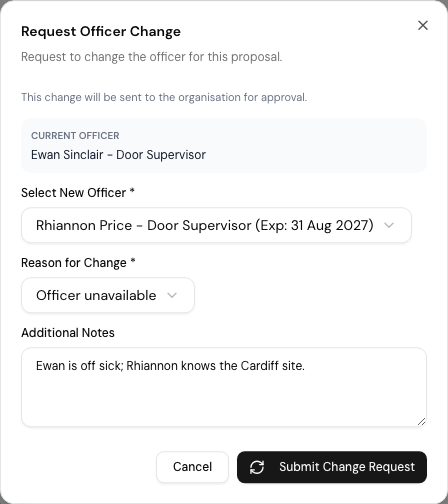
- Press Request Change — or Change Officer, if the organisation lets you change officers directly.
- In Request Officer Change, choose the Select New Officer. Each is listed with their licence and its expiry.
- Choose a Reason for Change — Officer unavailable, Officer backed out, Schedule conflict, Better qualified officer available or Other — and add Additional Notes if you like.
- Press Submit Change Request.
What happens next depends on where the proposal stands:
| When | What happens | You see |
|---|---|---|
| The organisation has not confirmed it yet | The officer on your proposal is swapped straight away | Officer updated on your proposal. |
| Confirmed, and the organisation allows direct changes | The swap is made, and the organisation is told | Officer changed. The organisation has been notified. |
| Confirmed, and it does not | The change waits for the organisation's Admin to approve or reject it; your request reads Change pending | …Awaiting admin approval. |
| Direct changes allowed, but the new officer has a clash or Working Time warning | Sent for approval instead | Sent to the organisation for approval: a scheduling or Working Time conflict on the replacement needs their decision. |
| Direct changes allowed, but the new officer does not hold the role asked for | Sent for approval instead | Sent to the organisation for approval: the replacement does not hold the role this shift requires. |
When a change on a confirmed shift goes through, both officers are told: the new one You have been assigned to … by your agency, the old one You are no longer covering …. Your agency has assigned someone else.
The line under the dialog's title says which applies: swapped straight away, changed directly, or sent for approval.
When is a new officer refused outright?
The same checks as a new proposal: not one of your officers, not yet accepted their login invite, deactivated, or a verified SIA licence or right to work that has expired by the shift's date. See What is checked before a proposal goes in?
What if the officer is booked somewhere else?
The clash comes up before anything is saved — Proposing … raises a conflict, listing each overlapping booking with its date, times, site and whether it is proposed or confirmed. Open request opens the other one.
- If the officer is already confirmed elsewhere at the same time, they cannot work both: This cannot be overridden.
- Anything else — an overlapping proposal, a Working Time warning — can go ahead with a Reason for proceeding and Propose anyway.
Where the other booking is one of yours, Put someone else on … frees the officer from it:
- Press it on the clash. The officers who are free are listed first.
- Pick a stand-in, and give a reason — Why is this officer being moved?
- If the other booking is only proposed, the stand-in replaces them there straight away. If it is confirmed, it becomes a change request for that booking, and the officer stays committed there until the organisation approves.
Details of a booking at another organisation are withheld — details withheld — another tenant.
If it goes wrong
| What you see | What it means |
|---|---|
| No Withdraw Proposal button | The proposal is confirmed. Request a change instead. |
| Cannot request changes for withdrawn proposals | That proposal is no longer live. |
| Officer not found or does not belong to your agency | Choose one of your own officers. |
| Change pending stays | The organisation has not decided. |
Related
- Find requests and propose officers
- Partner with an agency — where the organisation allows direct changes
- Review proposals and confirm officers — the organisation's side
- Overtime and the Working Time Directive
Last updated 2026-10-09