Set holiday pay and bank holidays
Two settings decide what leave and bank holidays are worth. Holiday Pay chooses how a day of annual leave is valued — the 52-week average, or rolled-up holiday pay for the workers it is lawful for. Bank Holidays lists the dates on which hours worked are paid and charged at double time. Admins and Managers can change both.
Who can change these?
Admins and Managers, from Settings → Holiday Pay and Settings → Bank Holidays in the Organisation part of the settings sidebar. Anyone else is refused with Access denied. Admin or Manager role required.
How is a day of holiday paid?
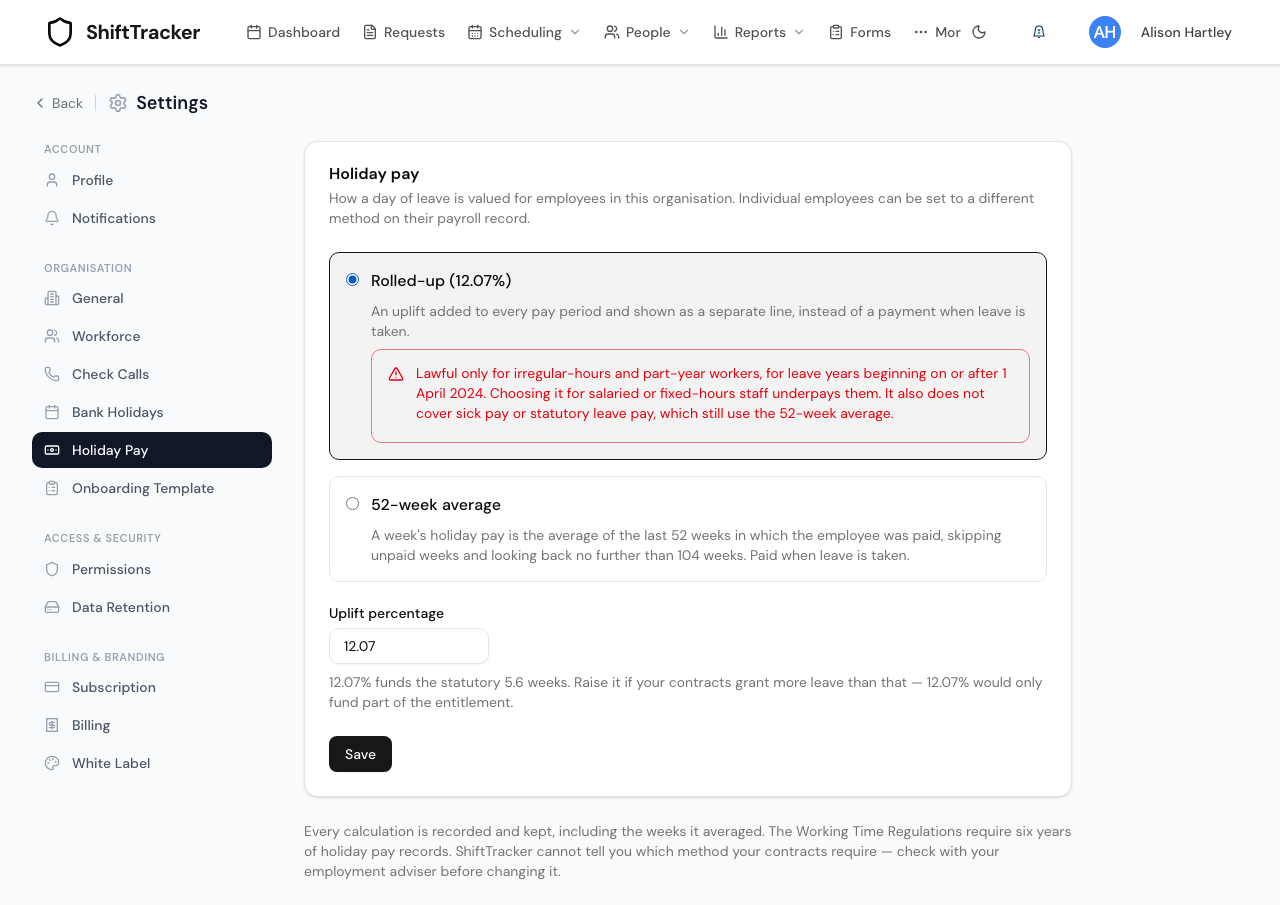
Choose one method for the whole organisation under Settings → Holiday Pay, then press Save.
| Method | How it works |
|---|---|
| 52-week average | A week's holiday pay is the average of the last 52 weeks in which the employee was paid, skipping unpaid weeks and looking back no further than 104 weeks. Paid when the leave is taken. This is the default. |
| Rolled-up (12.07%) | An uplift is added to every pay period and shown as a separate line, instead of a payment when leave is taken. Set the Uplift percentage below it. |
Rolled-up is lawful only for irregular-hours and part-year workers, for leave years beginning on or after 1 April 2024. Choosing it for salaried or fixed-hours staff underpays them. It also does not cover sick pay or statutory leave pay, which still use the 52-week average. ShiftTracker cannot tell you which method your contracts require — check with your employment adviser before changing it.
The default Uplift percentage, 12.07%, funds the statutory 5.6 weeks. If your contracts give more leave than that, raise it; it cannot be set below 12.07%.
When is holiday pay worked out?
When an Admin or Manager approves an employee's annual leave. ShiftTracker calculates that leave's pay with the method in force, and records the calculation — including the weeks it averaged — so it can be produced later. The Working Time Regulations require six years of holiday pay records. Holiday pay then appears on the Pay Detail report.
Other kinds of leave are not valued this way.
The screen says individual employees can be set to a different method on their payroll record. The record does hold such a setting, but no screen sets it today, so every employee follows the organisation's method.
How do bank holidays work?
Hours worked on a registered bank holiday — from midnight to midnight — are paid and charged at double time. A shift that crosses midnight into or out of a bank holiday has only the hours inside the bank holiday doubled. Arbitration flags the record Includes …h Bank Holiday pay at 2x rate.
ShiftTracker does not know the bank holidays by itself. Only dates registered on this screen count.
- Go to Settings → Bank Holidays.
- Under Add New Holiday, choose the Date and type the Holiday Name.
- Press Add Holiday. It appears under Registered Bank Holidays.
To remove one, press the bin beside it.
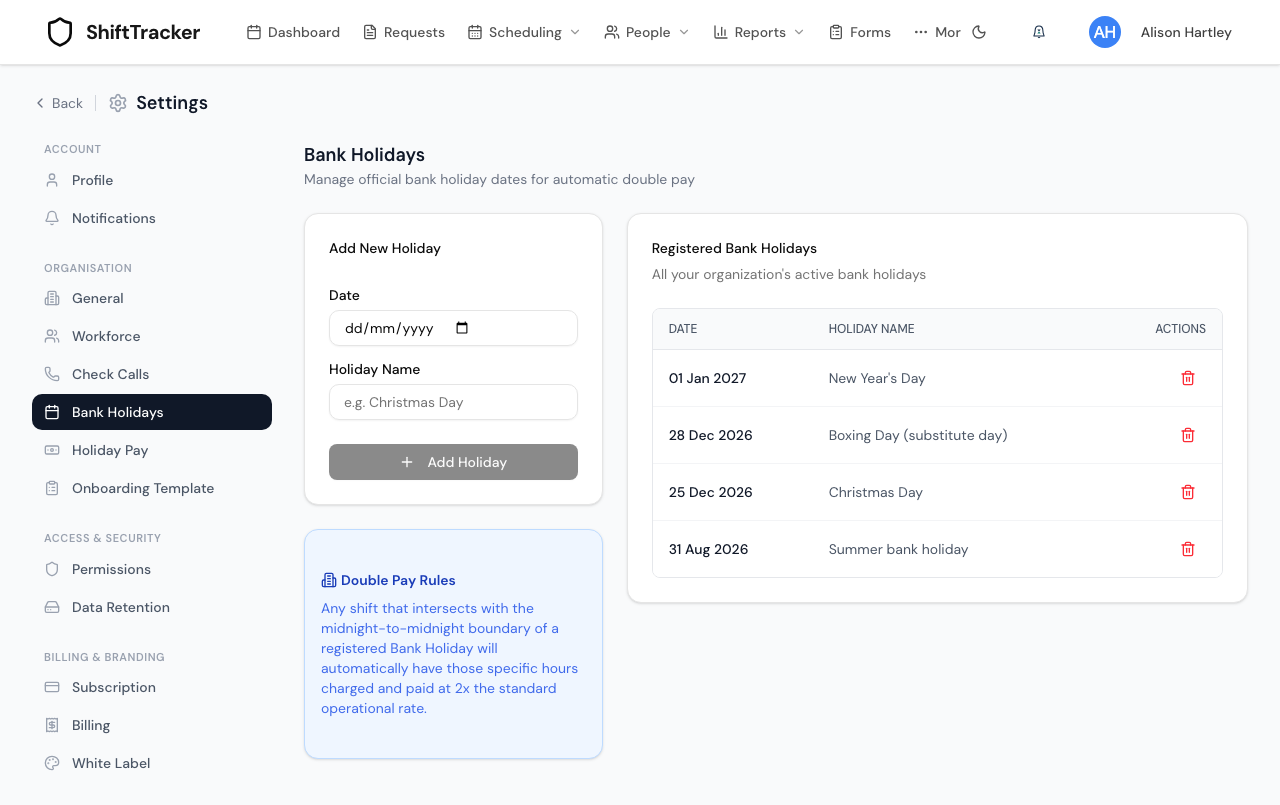
Add the dates before the shifts on them are arbitrated. Arbitration reads the list when it writes each record, and does not go back over records that already exist.
Double time applies to your own employees. Agency officers' arbitration, where it is switched on, does not use bank holidays. An employee's payroll record can exclude them from bank-holiday pay, but no screen sets that today, so in practice every employee gets it.
If it goes wrong
| What you see | What it means |
|---|---|
| Access denied. Admin or Manager role required. | Your role cannot change organisation settings. |
| Please provide both date and name | Fill in both before pressing Add Holiday. |
| A bank holiday shift was paid at the normal rate | The date was not registered when the shift was arbitrated. Register it, then correct the record from Arbitration. |
| holidayUpliftPercent must be at least 12.07 (the statutory minimum) and at most 100 | 12.07% is the minimum that funds the statutory 5.6 weeks; above 100% is treated as a typo. |
Related
Last updated 2026-10-09