Screen officers to BS 7858
Agencies screen their officers to BS 7858 on the Screening tab of the officer's profile: the same five- or ten-year window, periods, gap check, applicant consent and references as an organisation uses for its own staff. Both agency roles can run a screening and mark it complete; only an Agency Admin can override the consent gate or accept a gap, and each override is on your audit trail with its reason.
Where is it?
People → Officers, open the officer, then the Screening tab. Only your own agency sees it; an organisation the officer works for never does. What an organisation does see is a single BS7858 line on the officer's card on its request page — Cleared once you have marked the screening complete, Screening in progress before that.
Who can do what?
| Action | Agency Admin | Agency Coordinator |
|---|---|---|
| Start screening, edit the window, add periods, set check dates | Yes | Yes |
| Send consent links and references, remind, mark received, cancel | Yes | Yes |
| Mark complete | Yes | Yes |
| Override (Admin) the consent gate, Override gaps (Admin) | Yes | No — the buttons are not shown |
Every consent or gap override is recorded on your agency's audit trail, with the reason given.
How does it work?
Exactly as it does for an organisation's employees, with your agency's own copy of the BS 7858 rules: a 5-year window by default, gaps of 31 days or more, at least 1 employment and 2 character references received, and the applicant's consent before any reference goes out. The full procedure — starting a record, the consent link, periods and the coverage timeline, references by magic link or log, reminders, check dates and Mark complete — is on Screen staff to BS 7858.
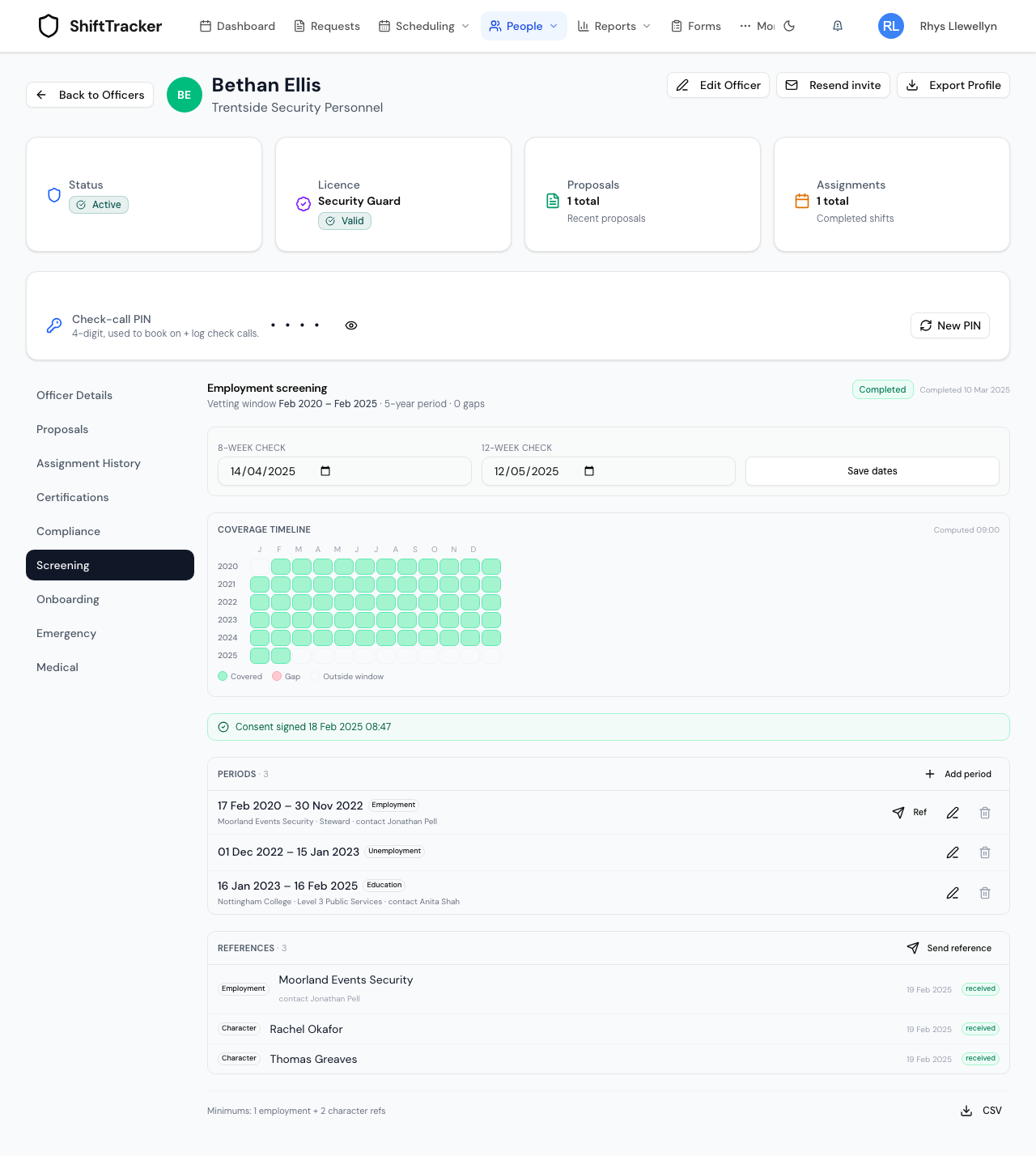
A gap does not have to be a job. A stretch out of work, in education or travelling counts as covered once it is recorded as a period of that type — as Bethan's Unemployment and Education periods are above.
What changes when it is complete?
The status reads Completed with the date, and Mark complete and Edit window disappear. Periods, check dates and references can still be edited; the screening stays complete. On an organisation's request page the officer's BS7858 line reads Cleared.
If it goes wrong
| What you see | What it means |
|---|---|
| … gap(s) unresolved — an Agency Admin can override | Add a period covering the gap, or have an Agency Admin accept it with a reason. |
| Applicant consent required before issuing references | The officer has not signed the consent link yet. |
Related
Last updated 2026-10-09