Register your agency and accept a partnership
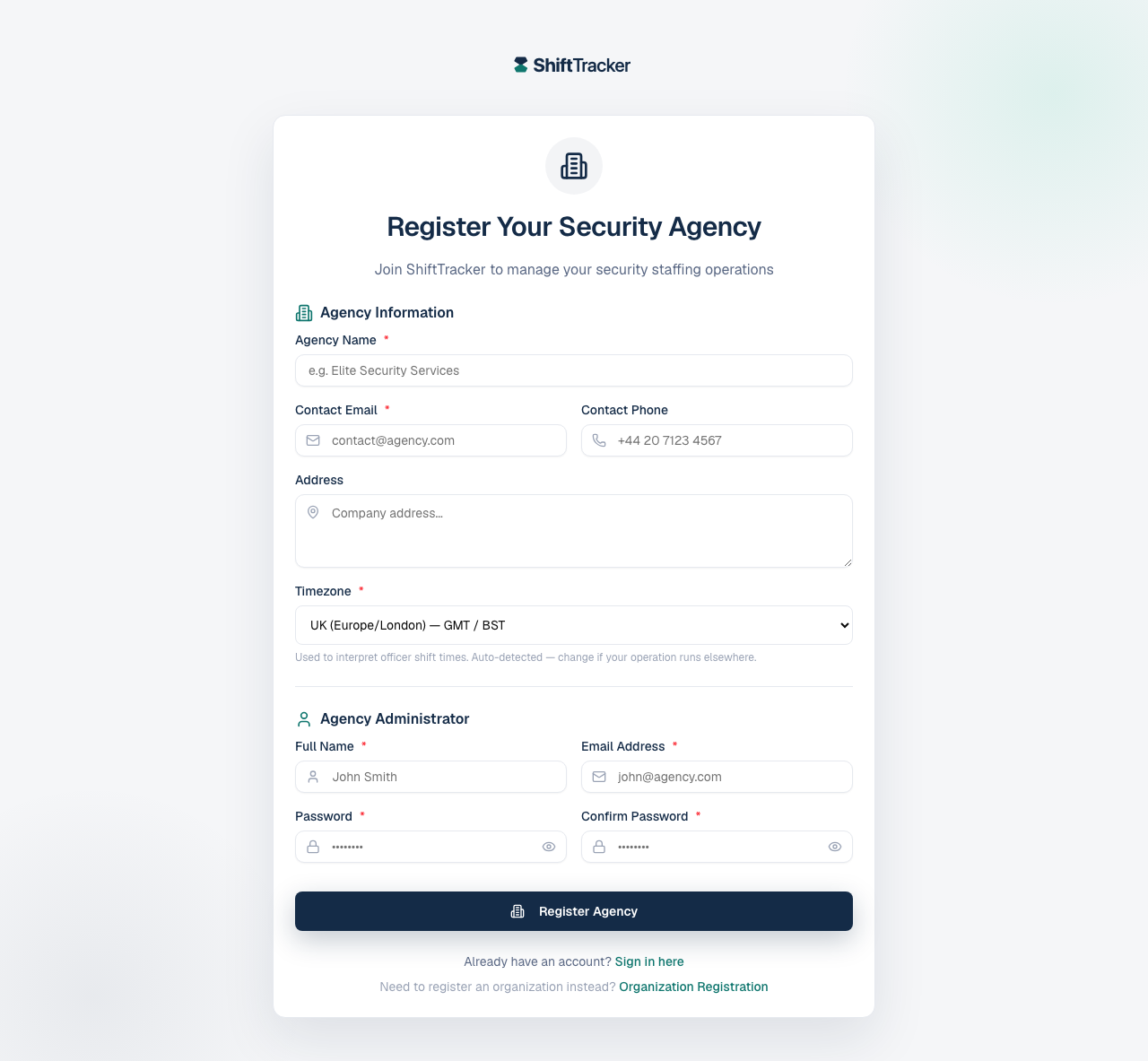
An agency signs up at Register Your Security Agency with its own details and its first administrator, and starts on a 30-day trial. Organisations then invite it to partner with them; the invitation shows on the agency dashboard, where an Agency Admin or Agency Coordinator accepts or declines it. Only once you have accepted will an organisation's requests reach you.
How do I register my agency?
- Go to Create your account and choose Security agency, or go straight to
/register/agency. - Under Agency Information, fill Agency Name, Contact Email, and optionally Contact Phone and Address.
- Check the Timezone. It is detected from your browser — Used to interpret officer shift times — so change it if your operation runs elsewhere.
- Under Agency Administrator, give the Full Name, Email Address and a Password for the first person who will run the account, and confirm it.
- Press Register Agency.
Registration Successful follows. The administrator is emailed a link to verify the address, and Sign In to Your Account takes them to the login page.
| Rule | |
|---|---|
| Password | At least 12 characters, not a common one, and strong enough — mix upper and lower case, numbers and symbols |
| Agency name | Not already registered — Agency name already registered |
| Administrator email | Not already used by any account — Admin email already registered |
Which plan am I on?
The core plan, on a 30-day trial. Agencies join free and pay only for officers on their own client sites; officers working an organisation's sites never cost the agency anything. See Subscription and billing.
What does the Contact Email do?
It is how organisations find and reach you: agency-wide emails go there, and an organisation finding you on ShiftTracker sees it. Use an address you check, and keep it current — Contact Email in your agency's settings. It does not decide which invitations reach you; the link in the invitation email does.
How do I accept a partnership invitation?
An organisation invites you from its Security Agencies page. You are emailed — Partnership Invitation from … — with a View & respond link: to your dashboard, or, if your agency is not on ShiftTracker yet, to registration. Open the link as an Agency Admin or Agency Coordinator (sign in if asked), or register from it, and the invitation is added to your agency and waits on your dashboard. The link works for whoever holds it, so it can go to a shared inbox — don't forward it outside your agency.
An invitation sent to an address that one of your Agency Admins or Coordinators signs in with, once that address is verified, also shows on your dashboard without the link.
- Sign in. On your dashboard, Partnership Invitations — Organizations inviting you to partner with them — lists the invitation: the organisation, the Invited Email, when it Expires, the Relationship, any Rate Modifier, and the organisation's message.
- Press Accept Partnership, then Accept Partnership again in the dialog — This will establish a formal partnership between your agency and the requesting organization.
- Or press Decline. It takes effect straight away; there is no second step.
Accepting creates the partnership at once. From then on, the organisation can share requests with you and you can propose officers for them. If you had partnered with that organisation before and it lapsed, accepting reactivates it.
Agency Admins and Agency Coordinators can both accept and decline.
An invitation can be accepted for 7 days. After that, it no longer shows on your dashboard, and accepting an old one says Invitation has expired — ask the organisation to invite you again. Refresh reloads the list.
If it goes wrong
| What you see | What it means |
|---|---|
| No Partnership Invitations | Nothing pending for your agency. Open the View & respond link in the invitation email while signed in — that adds it here. |
| This invitation was not sent to your agency | It went to a different agency's address. |
| Invitation not found or already processed | It has already been accepted or declined. |
| Invitation has expired | More than 7 days old. Ask for a new one. |
Related
- Organisation, agency, client — who is who
- How a request becomes a rostered shift
- Partner with an agency — the organisation's side
Last updated 2026-10-09