Agency Reports
Agency Reports counts the staffing requests you raised over a period, the hours they asked for, how many of those hours an agency confirmed, and which officers worked them. Organisations see every agency they work with; an agency sees only the requests shared with it and its own officers. It is also where the SIA Compliance and Right to Work reports are opened from.
Who can use it?
| Role | Sees |
|---|---|
| Admin, Manager | Every request your organisation raised, across all agencies |
| Agency Admin, Agency Coordinator | Only requests shared with their agency, and only their own officers |
| Control | Nothing — no menu entry, and opening it directly reads Access Denied |
Open Reports → Agency Reports. Agency users find it in the same place, and from View Reports in their dashboard's Quick Actions.
How do I run it?
- Set the two dates, or use a Quick link: This Month, Last Month, This Quarter, Last 30 Days. It opens on the current month.
- Narrow it if you want. Organisations get All Sites, All Agencies and All Officers; agencies get All Officers only.
- Choose Summary or Detailed.
The report runs again by itself whenever you change any of these. Refresh runs it again as it is. A range can be at most 366 days.
What does the Summary show?
| Part | What it counts |
|---|---|
| Total Requests | Every request dated in the range, whatever its status |
| Total Hours | The hours those requests asked for — each request's hours × the number of officers it wanted — leaving out cancelled requests |
| Billable Hours | The hours on Confirmed requests |
| Efficiency Rate | Billable Hours as a share of Total Hours: how much of what you asked for was confirmed |
| Request Status Breakdown | How many requests are at each status, cancelled ones included |
| Agency Performance | Per agency: the requests shared with it, their hours, the confirmed hours it holds, and its efficiency |
| Site Activity | Per site: requests and hours |
| Top Performing Officers | The ten officers with the most hours worked, with their agency and number of assignments |
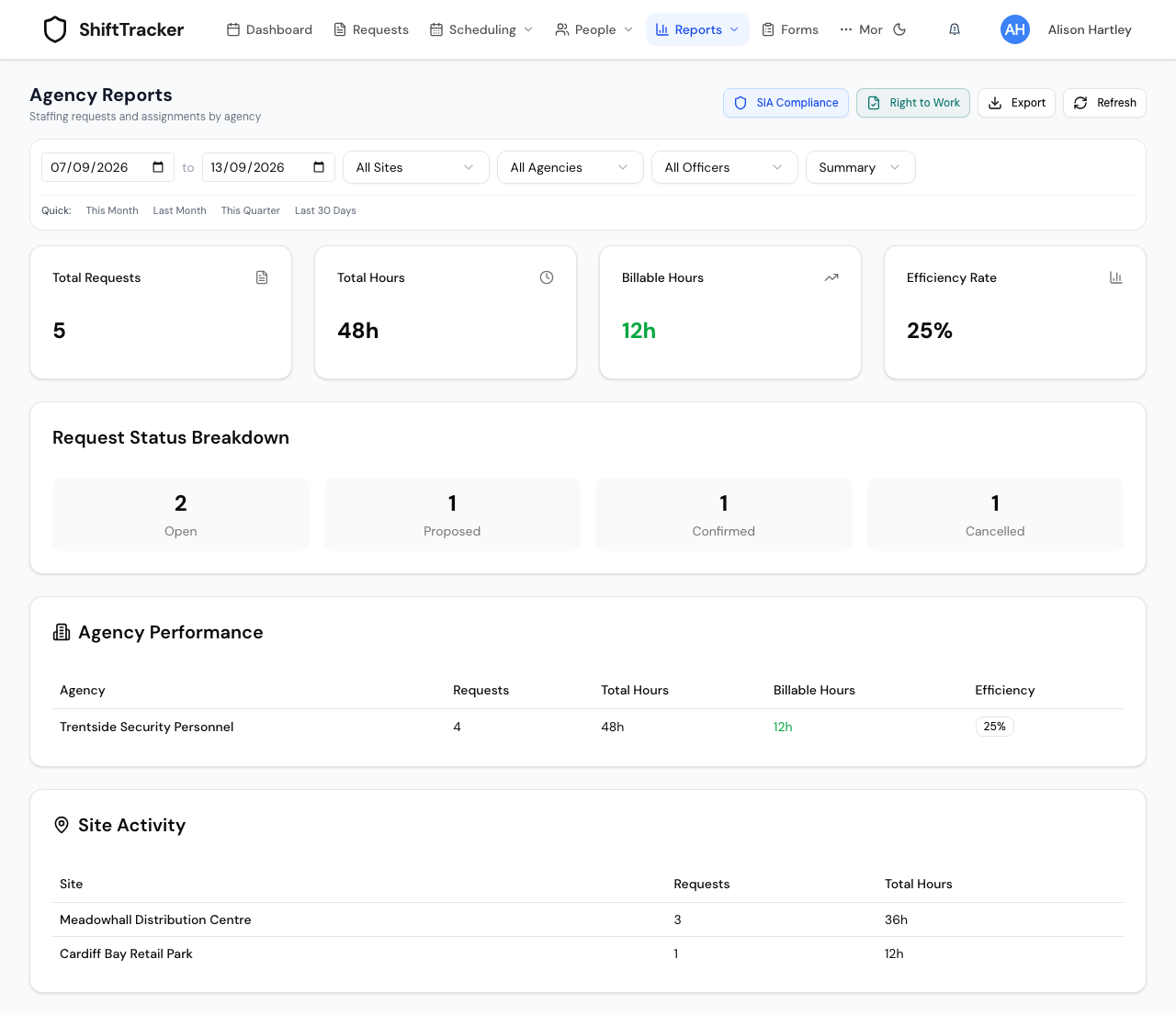
Top Performing Officers only appears once officers have hours worked in the range — from the shift's arbitration if there is one, otherwise the officer's clock-in and clock-out, otherwise the hours the agency recorded. The demo week above is still to be worked, so it has none yet.
An agency's Summary has the four cards, the status breakdown and its own top officers. It has no Agency Performance or Site Activity. Its Billable Hours are the confirmed hours its own officers hold — never hours on a request another agency won.
What does Detailed show?
One row per assignment — an officer confirmed onto a request — newest first: Date, Site, Officer, Agency, Start Time, End Time, Scheduled Hours, Worked Hours and Status.
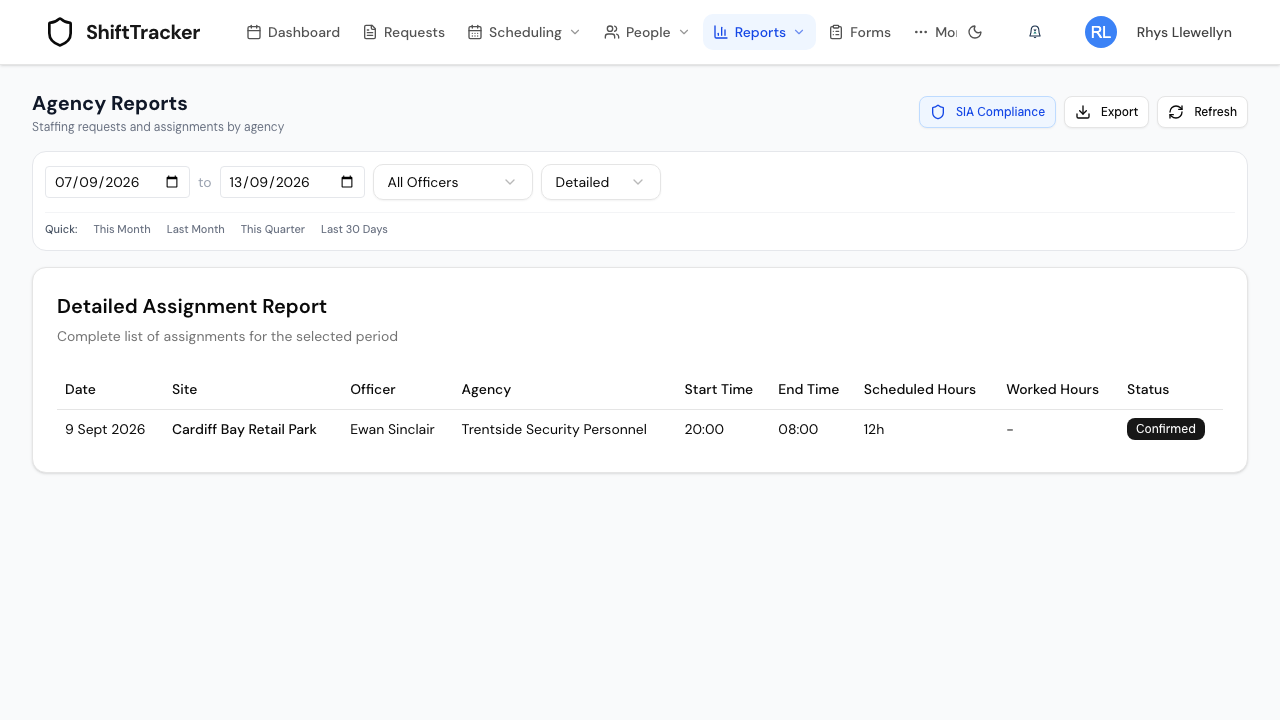
Worked Hours reads a dash until there is something to show. It also stays a dash when the clocked time is far longer than the shift — a missed clock-out, usually — until someone arbitrates it. The start and end times show seconds, as above.
How do I export it?
Press Export and choose CSV or Excel to download the report on screen — Summary or Detailed, with the same filters. The button is greyed out until a report has loaded. Every export is recorded on the audit trail, an agency's on its own agency audit trail.
What are the SIA Compliance and Right to Work buttons?
Two more reports, opened from this screen's header.
- SIA Compliance — every agency officer with their SIA licence number, type, expiry and status, and a link to the public SIA register to check them by hand. An organisation sees the officers who have worked its requests, and can filter by agency; an agency sees all its own officers, and can filter by organisation. See SIA licences: what is recorded.
- Right to Work — the right-to-work documents of agency officers who have worked your sites. Shown to anyone holding
documents.view.agency_rtw(Admin and Manager by default). See Check agency officers' right to work.
If it goes wrong
| What you see | What it means |
|---|---|
| This report did not load — You do not have permission to view agency reports. | Your role cannot use it. |
| This report covers at most 366 days; … Narrow the date range. | The range is too long. Narrow it. |
| No Report Generated | The report has not loaded. Press Generate Report. |
| Billable Hours lower than you expected | Only Confirmed requests count. Open and proposed ones are in Total Hours only. |
| An officer missing from Top Performing Officers | They have no hours worked in the range yet, or their request was cancelled. |
| Export is greyed out | No report has loaded yet. |
Related
Last updated 2026-10-09